
Inspiring
January 12, 2018
Answered

Still Cannot Get Flash to Work in Opera for FB Games

  • January 12, 2018
  • 3 replies
  • 5846 views

I can get flash to work on both Chrome and Firefox, but not Opera for FB games.  I have tried all the suggestions that I have read so far.  Adding exception of [*.]com to websites.  Changing the numeric value to 100.  Making sure to download the appropriate flash players for both FF and Opera and Chrome.  Uninstalling the old Adobe and reinstalling the new ones.  Games worked up until recently (maybe the last week or so).  Tried everything here: flash player on opera does not work  and here: Opera browser updated and now I can't get flash player to install 

I am running Windows Home Version 10.0.16299 Build 16299  Opera version 50.0.2762.58, Flash Player 28PP-HC and 28HC

This link says "Your Flash Player is Out of Date Please Update it to Play the Game." Christmas Dreams 2017 on Facebook | Facebook
This topic has been closed for replies.
Correct answer RockyMtnHiker

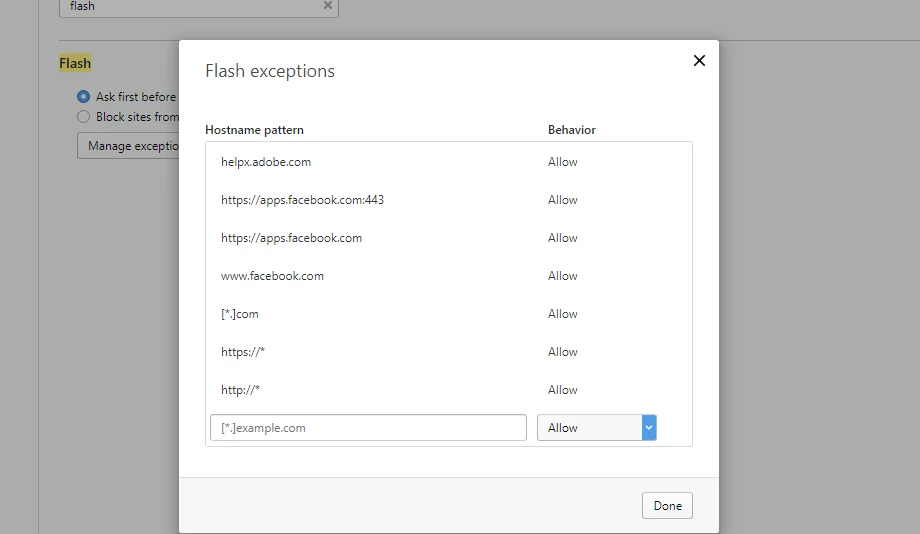
I added the exceptions as you said (screen shot attached).  I have cleared all cache, cookies, browsing and download history "from the beginning of time" and rebooted my laptop.  The game still will not play and I'm still getting the message "Sorry flash player is either not installed or not enabled" at the Flash Player Help site.  Do you have any other suggestions?  Or is this just an Opera issue?  Thanks for your help.


Ok, so I found this suggestion in another thread on here.  Go to opera://site-engagement and set all sites to 100.  I did that and BAM, everything works again and game will load.  So, this issue is resolved (at least until the next Opera update).  LOL  Thank you so much for being so helpful in trying to get this resolved.  I am very impressed with the Adobe staff.  Many thanks!!!  These forums are great and very helpful. 

3 replies

Participant
June 12, 2020

flash player keeps shutting down on facebook game room and its very frustrating what can i do?


_maria_
Community Manager
Community Manager
January 12, 2018

While Opera 50 is based on Chromium 64, it appears to handle Flash requests differently.  For example, on Chrome, when clicking the 'check now' button on the helpx.adobe.com/flash-player.html page, Chrome intercepts the request and prompts the user to allow Flash.  Opera has no such behaviour, forcing users to go to opera://settings to add the domain to the list of exceptions.

I added [*.].com and it did nothing.  Not sure if it's a valid entry or not.

Please try adding https://* and http:// to the list of exceptions instead of [*.].com

After adding https://* and http:// reload the browser. Flash Player will be detected on the http://helpx.adobe.com/flash-player.html page:

It is also playing on the Christmas Dreams 2017 on Facebook | Facebook game:

The black rectangle is not Flash content:

Inspiring
January 12, 2018

Nope.  That didn't work either.  I added both of those exceptions and still get "Sorry Flash player is either not installed or not enabled."  Game still doesn't play.  Here is a screen shot of exceptions.  Thanks.

_maria_
Community Manager
Community Manager
January 12, 2018

I reset the flash options on my test machine and went to the game again.  I clicked the green 'Update' button and Opera prompted to enable Flash:


I clicked 'Allow' and the browser refreshed, with Flash enabled.   This is essentially correct behaviour, as in this case, Opera intercepted the request to update Flash and prompted the user to enable Flash.

Going to Opera's Flash exception settings, the entry is https://apps.facebook.com:443:

I see the entry in your screenshot is just https://apps.facebook.com.  Please add :443 to it and see if that'll work.

If this doesn't work, I would try clearing browser cache/cookies and reboot the machine. This may or may not work.

ridhij4208356012135538
Adobe Employee
Adobe Employee
January 12, 2018

Hi,

Did you try viewing any other Flash Content in Opera browser? Open Flash Player Help page and click on "Check Now" button to see the version of Flash Player installed. If the version installed is not 28.0.0.137, then you do not have the latest version of Flash Player. You can go Adobe Flash Player Install for all versions page in Opera browser and download the latest version.

If you have latest version then go to Flash Player Help page and refer to "Verify whether Flash Player is installed". If the above mentioned content is working, you need to contact the gaming company.

Thanks!

Inspiring
January 12, 2018

Yes.  Did all of that and No, Flash player still isn't working by way of the check now website you posted above.  Attached is a screen shot.  Tried installing version from link you sent, still not working.  Tried installing the 28_pp gc and hc versions.  Still nothing working in Opera. Although all other browsers are fine.  I'm just stumped.  It has to be an Opera issue???