
March 8, 2017
Answered

Stop with the bloatware please for the sake of humanity

  • March 8, 2017
  • 1 reply
  • 1763 views

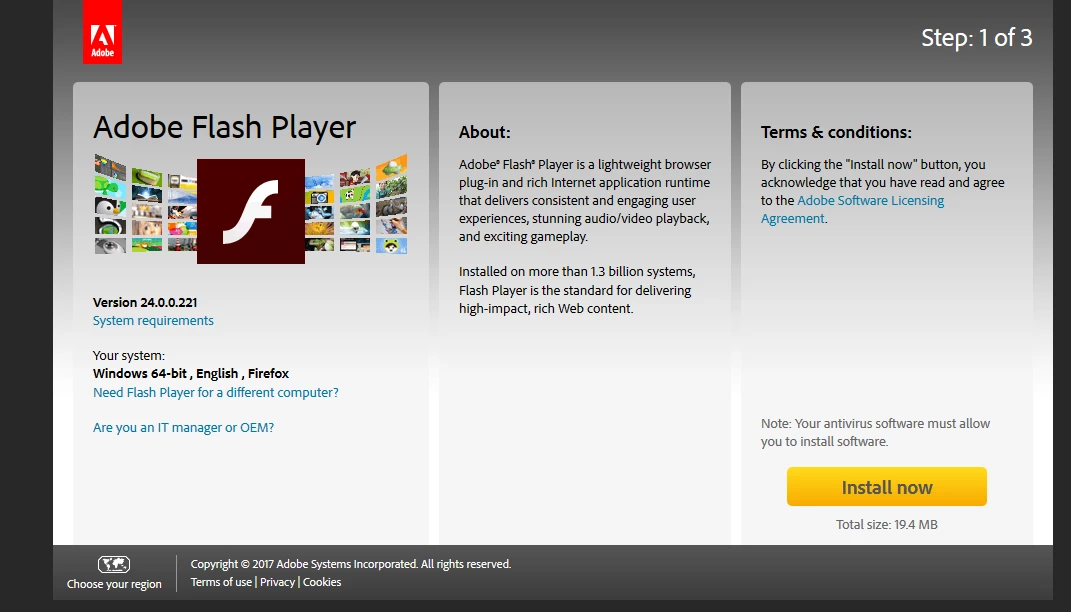
Using Firefox with ad-block, the only download option for the Flash updates that is offered is for the "bundled" version with mccafe and trustkey, two programs i have 0 interest in using. If i wanted those products, i would have sought them out myself. All i want is the Flash player. There isn't even a warning on the web page that the download is going to be multiple programs that i CANNOT INSTALL INDEPENDENTLY. The language on the page, as i see it, doesnt even mention the other products at all (see image.)

Why would you design your site so that, by default, the "optional" programs are included in the download?

You can play coy, but everyone knows that web designers know about ad-block now. They compensate for it, and design web sites to work with, or around it. So its more than a little suspicious that, conveniently, ad-block only disables the section of the page that allows you to opt-out of the bloatware. Everything else works fine, and it happily downloads the Flash bloatware suite for you. Kind of a stupid thing to do really, as the types of people who run adblock are also the types of people who would notice, and be particularly offended by, the bloat. I don't know if you are intentionally trolling adblock users, or if you thought nobody would notice, or that if they did notice they wouldn't care? But i dont appreciate having to go through my control panel to delete two programs (and restart my pc) after updating a small plugin.

Don't tell me to disable ad-block then come back to redownload. Thats not a solution, when everything else on your site works 100% fine with ad-block enabled.

Don't tell me to enable auto-updates, because i already have enough programs constantly running in the background regularly pinging for updates.

Maybe stop pushing bloatware on people. Bloatware on PCs is an anachronism, something that should have died in the 90s. Yet here we are....

Want me to whitelist your site, Adobe? This is literally the exact opposite way to achieve that end.
This topic has been closed for replies.
Correct answer

Color me surprised, your staff are condescending And apparently didn't even read my whole post? I said i'm not going to enable auto-updates and you tell me to enable auto-updates.... Great advice man. I also appreciate the lecture about profit and shareholders and the nature of freeware itself, incredibly relevant and also not utterly specious.

The better advice was the uninstall link. Flash is free because nobody would ever pay for it. You would overcharge anyway.

1 reply

jeromiec83223024
Inspiring
March 10, 2017

At the end of the day, delivering and maintaining Flash Player is a tremendously expensive undertaking.

I don't work on the team that maintains the site, so I can't comment on the specifics or intent of their implementation with regard to ad blockers, but the reality here is that pretty much whenever you're getting something for free, *someone* is paying for it.  Adobe is a for-profit corporations, and they're accountable to shareholders to make returns on those investments.  In a similar vein, product teams inside the company have to similarly be providing either strategic or financial value to the parent corporation.  This is true in any situation.

In this instance, the downloads provide impressions, those impressions promote bundled offers, and enough people find value in those offers that they ultimately buy the products, which in turn provides the revenue that allows us to maintain and provide Flash Player to you, free of charge.  The user interface and experience is tuned to meet the business requirements, which a.) comply with the law, and b.) generate adequate amounts of revenue.

You're absolutely welcome to not participate in that ecosystem.

You have a couple options:

  1. Use a browser that partners with Adobe to bundle Flash Player as a built-in component of their browser.  Currently, Google Chrome on all platforms, as well as Internet Explorer and Edge on Windows 10 include Flash Player as a built-in component, so you never need to come to the Adobe website to get Flash.

  2. Install Flash Player, and set it to Automatically Update.  We'll keep Flash Player updated in the background, and you won't get prompted to go to the Product Download Center to get an update (unless you reinstall or something).

  3. Simply uninstall Flash Player and don't use it.  I've provided the uninstaller links for your convenience, below:

Uninstall Flash Player - Mac:

https://helpx.adobe.com/flash-player/kb/uninstall-flash-player-mac-os.html

Uninstall Flash Player - Windows:

https://helpx.adobe.com/flash-player/kb/uninstall-flash-player-windows.html

Correct answer
March 11, 2017

Color me surprised, your staff are condescending And apparently didn't even read my whole post? I said i'm not going to enable auto-updates and you tell me to enable auto-updates.... Great advice man. I also appreciate the lecture about profit and shareholders and the nature of freeware itself, incredibly relevant and also not utterly specious.

The better advice was the uninstall link. Flash is free because nobody would ever pay for it. You would overcharge anyway.

Participating Frequently
July 1, 2020

[abuse removed by mod]