Strange displays of Web Flash Files.
When I try to view a flash file on a web site using Flash Player version10.1.53.64.I get the following display:-
.
I have Windows XP Pro SP3, Internet Explorer 7 (both with the latest updates)
Graphic Card – Nvidia GeForce GT 220 (with the latest drivers).
I have uninstalled Flash Player (using the Flash Player uninstaller) and re-installed; disabled my virus program and firewall, but still with no success.
I have tried turning off hardware acceleration, again with no success.
My Windows System 32 shows the following installation files of Flash Player.
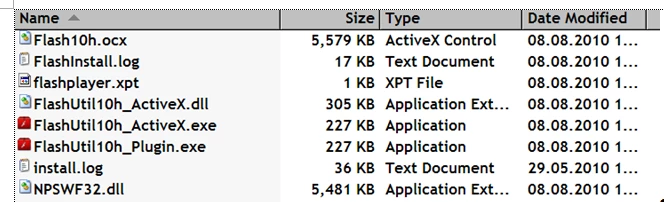
When I view the same flash file using my laptop with Windows 7 and Internet Explorer 8 and Flash Player 10.1.53.64.installed, and with the same virus and firewall programs (not disabled) it displays correctly. The laptop has identical flash files as shown, in XP, above.
Therefore, there must be something in Windows/Internet Explorer 7 that is causing the problem.
Has anyone experienced this problem?
Can anyone suggest a remedy, please?
Many thanks for any help
Bill
 AdChoices