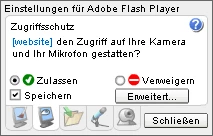
Yeah, unfortunately that class of dialog is problematic. They were created when VGA screens were the standard. The nature of their design means that there's not a great way to fix them for modern displays, which are 10-15x "bigger" in terms of pixel density. The dialogs themselves live inside fixed pixel-sized containers, and throwing a scaled dialog may cause the dialog to exceed the bounds of the parent, which would be useless and potentially so big that you couldn't close it. It's one of those nasty problems that only comes up because we're a browser plug-in and not a native application. Leaving the dialog as-is is the least bad of multiple bad options. 
To work around this, we introduced a native control panel for Flash Player, which gives you a better way to adjust Flash Player settings and behavior on modern machines.
Instead of messing with this dialog, Go to Control Panel > Flash Player > Camera and Mic, and click Camera and Microphone Settings by Site. Once you've set the appropriate permissions, just refresh the page and you should be good to go.




 AdChoices