
August 21, 2015
Question

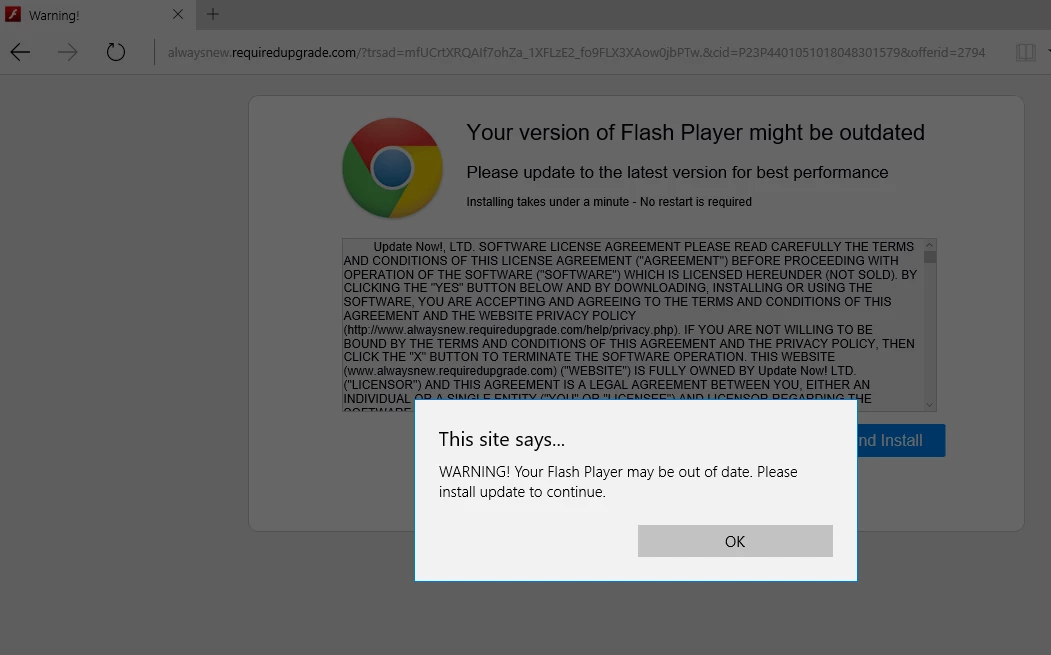
This site says... WARNING! Your Flash Player may be out of date. Please install update to continue.

  • August 21, 2015
  • 2 replies
  • 1503 views

Windows 10

Latest Flash player

EDGE browser

This window comes up and can only be closed via task manager end task.

If this is malware is there a way to block it?
    This topic has been closed for replies.

    2 replies

    _maria_
    Community Manager
    Community Manager
    August 21, 2015

    Hi MikeinVA,

    Is it possible for you to obtain the entire URL of the page, without actually downloading a file?  Are you able to click in the address field or does the pop-up window prevent you from doing that?

    --

    Maria

    August 21, 2015

    Maria,

    Thanks for responding… not sure if I made multiple posts as the submit button was greyed out some time.. (First time posting here)

    I killed the task a couple of time after taking the snip and haven’t seen it again so far today.

    I didn’t touch the OK button, could not shut down via upper right X, nor by close window from the task bar.

    If I see it again and can copy the url I will do so.

    I’ll try view source if that is possible as well.

    Mike

    _maria_
    Community Manager
    Community Manager
    August 21, 2015

    Hi MikeinVA,


    Thank you for posting the screenshot.  It's not an official Adobe Flash Player update notification and could very well be malware or similar.  Several things point to this: not an official adobe.com domain, conflicting flash player page icon (upper left) and Google Chrome icon in the center of the page. So it appears someone combined the Google Update page with Flash Player update text.  In addition Microsoft embeds Flash Player in Edge (and IE) on Windows 10 and all Flash Player updates are delivered by Microsoft via Windows Update.  You can check to see if you have the latest version of Flash Player, 18.0.0.232, installed by going to https://helpx.adobe.com/flash-player.html and clicking the 'Check Now' button. If the results indicate Flash Player version 18.0.0.232 is installed then you have the latest version.  If it shows a previous version run Windows Update to check for the "Security Update for Internet Explorer Flash Player for Windows 10".  This should be update KB3087916.

    Adobe does actively go after malicious actors who attempt to trick users into installing fake/malicious Flash Players.  I have forwarded this to the appropriate folks here to follow-up on.

    I recommend scanning your computer for malware, adware, viruses, etc and taking appropriate action to fix your system.  These steps are beyond the scope of the Flash Player user forums.

    --

    Maria