


michaelu94503647
Participant
August 20, 2018
Answered

Trying to install Flash 7.19 or something similar.

  • August 20, 2018
  • 4 replies
  • 597 views

I am trying to recreate the following site as it was back in 2005:

LucasArts: Battlefront II

Currently, it performs an intro animation for several seconds before failing and showing the following alert message:

We were unable to detect the Flash 7.19 player on your computer, which is required to view this content.

I have managed to uninstall the current version of Flash. Here is the confirmation for IE: 
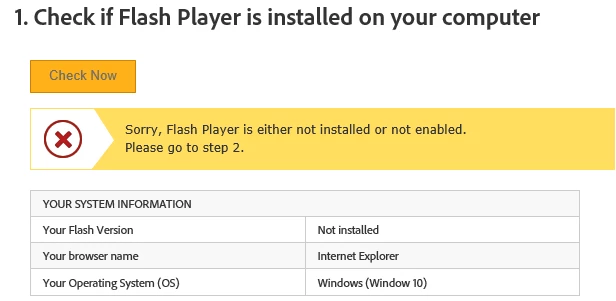
Then I went to the downloads page for older versions. I tried the fp7_archive, then fp8_archive, then, for good measure, fp_10.1.85.3_and_9.0283_archive. None of them installed after running the installers and restarting the computer. The same flash status is present as shown above.

What can be done?

This topic has been closed for replies.
Correct answer _maria_

No modern browser is going to allow Flash Player 7.x to run.  In this case, you're attempting to view the content on Windows 10 with Internet Explorer.  Microsoft has been embedding Flash Player ActiveX Control in IE since Windows 8 (and Edge on Windows 10).  Due to Microsoft embedding Flash Player ActiveX in IE and Edge, there's no possible way to install a previous version, especially one that is obsolete on Windows 8/10.


Modern browsers also block Flash by default, forcing users to enable it, usually on a per site basis.  In your case, you need to enable Flash in IE for the System Information widget to detect it and display the version installed.

FWIW, I attempted to view the content on Windows 10 with Chrome (Google embeds Flash Player PPAPI in Chrome) and on IE and Edge browsers.  For each browser, I had to manually enable Flash for the given site.  After doing so, Chrome and IE display the content for a split second then it only displays a black screen.  Edge simply displays a black screen. 

4 replies

michaelu94503647
Participant
September 5, 2018

I solved the issue (mostly, sound is missing).

I used oldweb.today to simulate Internet Explorer 5.5. Probably the best thing one can do, secondary to perhaps running an older version of Windows and a browser. It certainly is the most convenient.

_maria_
_maria_Correct answer
Legend
August 20, 2018

No modern browser is going to allow Flash Player 7.x to run.  In this case, you're attempting to view the content on Windows 10 with Internet Explorer.  Microsoft has been embedding Flash Player ActiveX Control in IE since Windows 8 (and Edge on Windows 10).  Due to Microsoft embedding Flash Player ActiveX in IE and Edge, there's no possible way to install a previous version, especially one that is obsolete on Windows 8/10.


Modern browsers also block Flash by default, forcing users to enable it, usually on a per site basis.  In your case, you need to enable Flash in IE for the System Information widget to detect it and display the version installed.

FWIW, I attempted to view the content on Windows 10 with Chrome (Google embeds Flash Player PPAPI in Chrome) and on IE and Edge browsers.  For each browser, I had to manually enable Flash for the given site.  After doing so, Chrome and IE display the content for a split second then it only displays a black screen.  Edge simply displays a black screen. 

michaelu94503647
Participant
August 21, 2018

Acknowledged. I'll see what I can do about running a Windows XP environment before viewing the site again.

Jeffrey_A_Wright
Legend
August 20, 2018

Moving this discussion to the Installing Flash Player forum.

Legend
August 20, 2018

If you want to recreate the sense of 2005, don't start with Windows 10 !