



Unable to autorize microphone use by Flash Player
Windows 7 64 bits / Firefox 45.0.1 32 bits / Flash Player 21.0.0.242
On a language learning site ( https://learning.telelangue.com/ ) on which our Users need to speak using a microphone, they are not anymore able to do so since we upgraded to Flash 21.0.0.242 (and Firefox 45.0.1 in the same time).
Previously, they had a Flash popup asking them to give the autorisation to use the microphone, and they were able to give this autorisation, but not anymore.
Now, the popup seems frozen : Your clicks are not changing anything on the popup and you can't even click "Close" to close this popup.
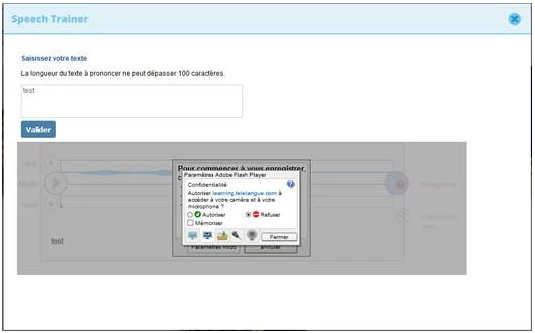 (sorry it's in French but it's basicaly asking to autorise Flash to use the Microsoft, but impossible to click "Autorise" nor "Refuse")
We've tried with or without the Flash protected mode but it doesn't change anything.
Has anyone any suggestion ?
Thanks in advance


 AdChoices