


Participant
August 10, 2017
Question

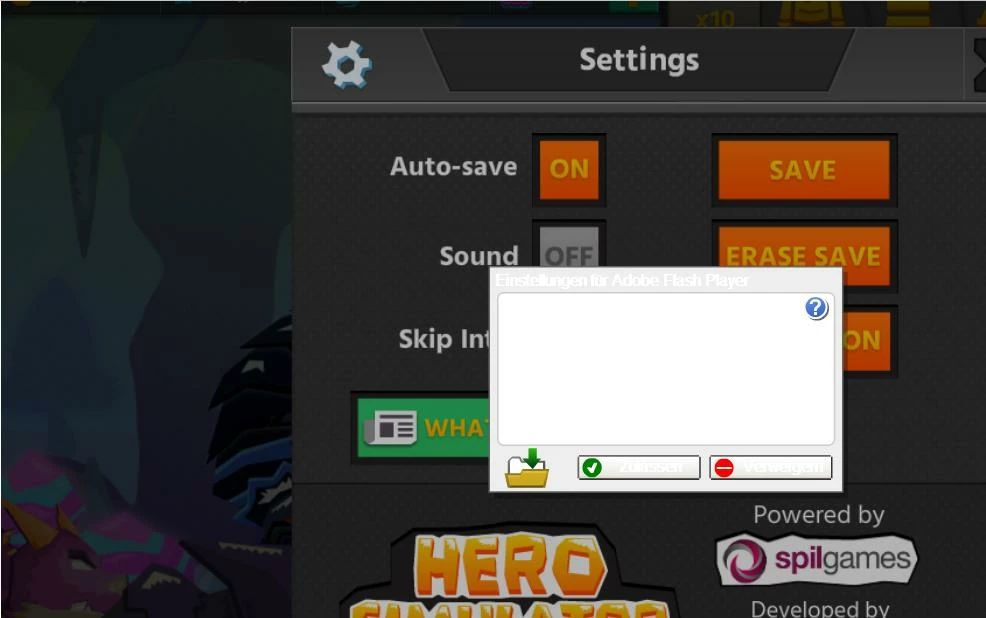
Unable to click Flash Player dialog

  • August 10, 2017
  • 1 reply
  • 626 views

I have the same problem ... Win10, Mozilla Firefox 55.0 (64-Bit), Adobe Flash Player version 26.0.0.151, Shockwave Flash is enabled. And the Adobe Flash Player Control Panel Applet doesn't react ...  Weird?
    This topic has been closed for replies.

    1 reply

    jeromiec83223024
    Inspiring
    August 10, 2017

    I've branched your post out to a new discussion.  This is a Flash Player security dialog, not the native control panel.

    In this instance, one of the challenges in being a browser plug-in is determining whether or not your dialogs are visible or obscured.  We employ a set of anti-clickjacking checks, which basically grab screenshots and compare them with what we think should be there, in order to determine whether or not an attacker has attempted to make the dialogs look like something that they're not.

    Generally, it's something moving in the background that trips up our detection logic (e.g. it pops up over the top of a playing video), but in this instance, it seems fairly static.  These problems tend to be resolution-specific, but changing your monitor resolution is not ideal.


    Honestly, the local storage stuff is largely superstition in 2017.  Clever marketers figured out that you could create resilient tracking tokens by abusing Flash Player's Local Shared Objects (aka. Flash Cookies), which were really intended to hold things like high scores from video games.

    In 2017, native HTML and JavaScript provide far more robust capabilities for tracking and identifying users than Flash does, and we respect the browser's Incognito/Private Browsing mode.  In most modern browsers, when you delete your cookies, we'll get a notification and will blow away Flash Player's LSOs at the same time.

    The easiest way to deal with this is to simply allow content to store data on your machine.  You can do that by going to Control Panel > Flash Player > Storage > Allow websites to store information on this computer.

    In situations where you *don't* want your activity tracked, your browser's Incognito mode addresses many of the vectors -- both JavaScript and Flash, by which tracking beacons may be added to your traffic.  These days (thank your Congress person), your Internet Service Provider may also get in on the act, using server-side tracking technologies over which you may not have control.  Using a VPN service is really the only way to get around that, unfortunately.

    Hope that helps!

    _Havarie_Author
    Participant
    August 10, 2017

    jeromiec83223024  schrieb


    Hope that helps!

    Not really. I'm not native English, besides the things are difficult to understand in my (German) language ...

    Moreover I already tried going to "Control Panel > Flash Player > Storage > Allow websites to store information on this computer" and still that damned window pops up after three seconds and freezes everything.

    jeromiec83223024
    Inspiring
    August 10, 2017

    Thanks.  I'm confused about why you still get that dialog.  It's possible that there's a site-specific preference that's overriding that preference.  If you hit Delete All > Delete all Site Data and Settings on that tab, that should clear any conflicting settings out.  You may also try exiting and restarting Firefox if that doesn't help.

    Recent versions of Firefox changed how things get drawn.  I have a suspicion that we may need to fix our clickjacking logic to accommodate those changes, but we need to debug it to understand what is actually happening.

    Can you give me the URL to the page that demonstrates this problem?