
November 8, 2016
Answered

Unable to install Adobe Flash Player

  • November 8, 2016
  • 1 reply
  • 354 views

I seem to be unable to install Adobe Flash Player on my Mac. This is the error message I receive after I download the application:
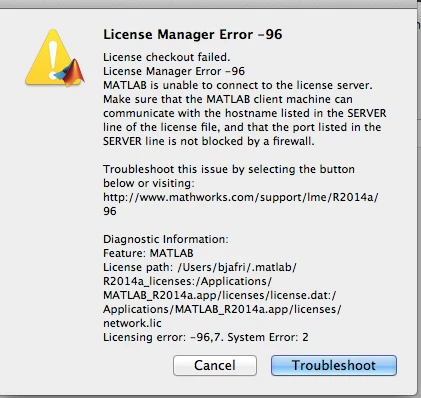
The Troubleshoot link leads to this page--Why do I receive "License Manager Error -96"? - MATLAB Answers - MATLAB Central --which I honestly can't make sense of (gave it a try but failed).

I've also uninstalled the older version of Adobe FP that was on my computer. Any help would be greatly appreciated!!

This topic has been closed for replies.
Correct answer _maria_

Hi,

Please delete everything (.dmlp) after the .dmg in the file name for the Flash Player installer.

For some reason, when MathLab installed it appends the .mdlp extension to the DMG file that was downloaded.  When users attempt to launch it instead of being opened with DiskImageMounter, which is what OS X uses to open DMG files, it opens using MathLab.  If this happens in the future just delete '.mdlp' from the file name and DiskImageMounter will open the DMG, instead of MathLab.

--

Maria

1 reply

_maria_
_maria_Correct answer
Legend
November 8, 2016

Hi,

Please delete everything (.dmlp) after the .dmg in the file name for the Flash Player installer.

For some reason, when MathLab installed it appends the .mdlp extension to the DMG file that was downloaded.  When users attempt to launch it instead of being opened with DiskImageMounter, which is what OS X uses to open DMG files, it opens using MathLab.  If this happens in the future just delete '.mdlp' from the file name and DiskImageMounter will open the DMG, instead of MathLab.

--

Maria

November 8, 2016

That worked!! Thank you so, so, so, so much!!

_maria_
Legend
November 8, 2016

You're welcome.

--

Maria