


Participant
February 16, 2017
Question

Unable to install Flash Player ActiveX MSI

  • February 16, 2017
  • 2 replies
  • 3982 views

Hi

When trying to install Flash Player 24.0.0.x ActiveX, I get an error:
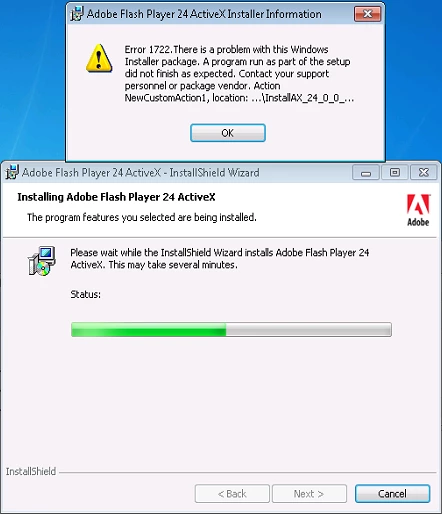
Event Viewer Error Message:

Product: Adobe Flash Player 24 ActiveX -- Error 1722.There is a problem with this Windows Installer package. A program run as part of the setup did not finish as expected. Contact your support personnel or package vendor. Action NewCustomAction1, location: C:\Users\USER\AppData\Local\Temp\{BBFE8F5D-C440-45C7-B9C5-B6445D2C9B56}\InstallAX_24_0_0_221.exe, command: -install -msi -prev 0

Haven't figured out how to add installer log yet, too long to paste here.

Chrome, Firefox MSI packages install with no problem.

Windows 7 Pro x64

This topic has been closed for replies.

2 replies

Ramil_R_Author
Participant
March 1, 2017

Thanks for the help !

The problem was that somehow the registry keys ACLs got corrupted as shown on the picture.

I was able to change the owner of the keys and delete them. After that the ActiveX installer worked fine.

Shared Files - Acrobat.com

_maria_
Community Manager
Community Manager
February 16, 2017

Hi,

I'll need to review the installation log files to troubleshoot the error.  Please provide the following log files:

  • FlashInstall.log files saved at C:\Windows\System32\Macromed\Flash AND C:\Windows\SysWOW64\Macromed\Flash
    • edit the file name to include system32 and syswow64 in the file name to easily identify which file is from which directory
  • Run the MSI installer again with v+x (verbose + extra debugging options) and save the output to a log file
  • Upload all 3 log files to cloud.acrobat.com/send using the instructions at How to share a document and post the link to the uploaded files in your reply

Thank you.

--

Maria

Ramil_R_Author
Participant
February 17, 2017
_maria_
Community Manager
Community Manager
February 21, 2017

Hi,

Can you please try running the ActiveX EXE installer as Admin (right-click 'Run as Administrator') on an impacted system?  After the installation completes, or fails, provide updated FlashInstall.log files (from both locations).

Thank you.

--

Maria