


Participating Frequently
April 20, 2018
Question

Uninstall Beta flash Player and install current to >2000 machines.

  • April 20, 2018
  • 1 reply
  • 1266 views

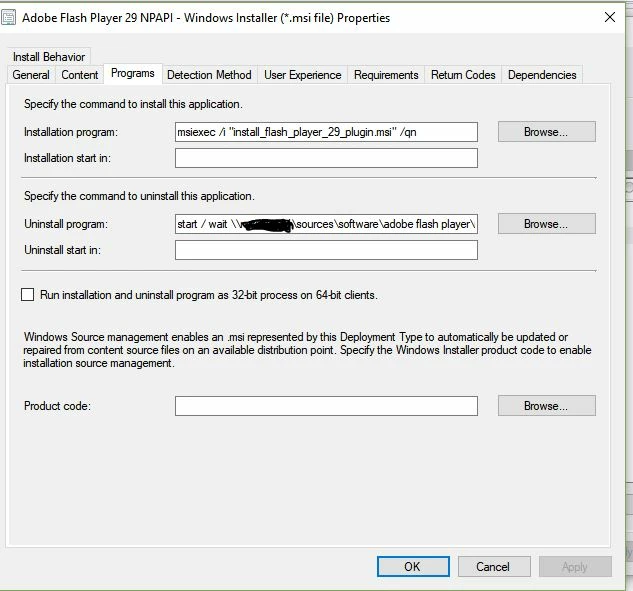
So now that we figured out we had beta versions on all the machines, I would like to deploy a fix for all. I tried to deploy it through SCCM but the installation fails. This works fine with no beta versions. So the uninstall program reads like this: start / wait \\%%%%%\sources\software\adobe flash player\uninstall_flash_player.exe -uninstall -force      It was this:msiexec.exe /x {FEE1FB25-E120-4FF9-A5F0-8F382D662AAA} /q     The 1st one points to the standalone uninstaller from Adobe  to a distribution point. The other generated by the .msi file. Any ideas how to uninstall all beta versions and then install the correct version? I need all the help I can get.
This topic has been closed for replies.

1 reply

_maria_
Legend
April 24, 2018

What uninstaller version are you using?  Did you download the beta uninstaller, from the beta downloads page, or the release uninstaller from Uninstall Flash Player for Windows

It was this:msiexec.exe /x {FEE1FB25-E120-4FF9-A5F0-8F382D662AAA} /q

I'm confused by this.  /x is the msiexec uninstall package command and this MSI GUID is for Flash Playe 29.0.0.140  NPAPI, which wouldn't be installed, since the system has the beta version installed

What is the /wait command for in the uninstall section?  Have you tried running just the uninstaller by itself, without attempting to also install version 29.0.0.140?

<edit>

For the benefit of other users, this is the continuation of Adobe Fash Player 29.0.0.155 beta uninstall to deploy 29.0.0.140

Participating Frequently
April 24, 2018

This works for Adobe Flash Player 29.0.0.140. So ignore the screen shot. The problem is we know we have a beta version on the computers. We need to get it off so I can deploy the correct version. I just learned that there is a separate uninstaller for the beta version. It was suggested to deploy the uninstaller separately to those machines(1000+). Then I can deploy the current branch of Flash Player. The problem is deploying the beta uninstaller. It doesn't seem to work and I can't find anything in administration manual to help. I really appreciate the help since I am new at this.

_maria_
Legend
April 24, 2018

The problem is deploying the beta uninstaller. It doesn't seem to work

I'm assuming you're using the beta uninstaller posted at Download Adobe Flash Player 29 Beta for Desktops - Adobe Labs  (bottom of the page), yes?

Please provide the FlashInstall log file(s) from a system where the beta uninstaller is not working.

  • 32-bit OS: C:\Windows\System32\Macromed\Flash\FlashInstall32.log
  • 64-bit OS: C:\Windows\System32\Macromed\Flash\FlashInstall64.log AND C:\Windows\SysWOW64\Macromed\Flash\FlashInstall32.log

Upload the files to cloud.acrobat.com/send (see https://forums.adobe.com/docs/DOC-7161​) or some other file sharing service of your choice that doesn't require log-in to access.  Post the link link to the uploaded file in your reply.


Thank you.