
Participant
October 27, 2020
Answered

Uninstall Flash & photoshop Elements 10

  • October 27, 2020
  • 1 reply
  • 366 views

Im trying to uninstall Flash & photoshop Elements 10 on my Mac running MacOS Catalina v 10.15.7 and im reading all the threads but it just says to download the uninstall software which I have done but I get the same issue. (Picture Attached)


Can I just delete the software or do I need to uninstall. If so how do I do it as nothing is working and I want it removed


Any ideas?
    This topic has been closed for replies.
    Correct answer _maria_

    The screenshot you posted isn't for Flash Player, it's for Photoshop Elements 10


    For Photoshop Elements, please post to the Photoshop Elements community forum page for assistance.


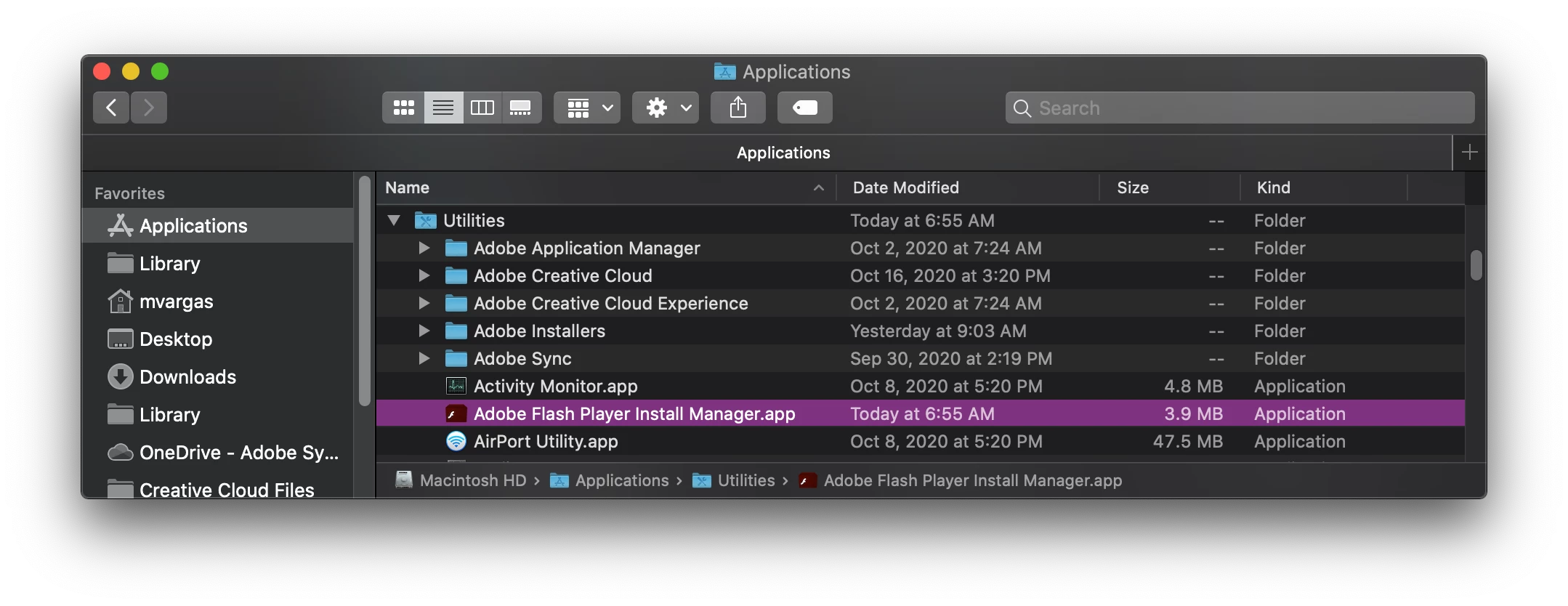
    For Flash Player, use the uninstaller posted at https://helpx.adobe.com/flash-player/kb/uninstall-flash-player-mac-os.html. Alternatively, you can also use the Adobe Flash Player Install Manager.app saved at /Applications/Utilities/Adobe Flash Player Install Manager.app to uninstall Flash Player

     <edit to include screenshot>


    1 reply

    _maria_
    Community Manager
    _maria_Community ManagerCorrect answer
    Community Manager
    October 27, 2020

    The screenshot you posted isn't for Flash Player, it's for Photoshop Elements 10


    For Photoshop Elements, please post to the Photoshop Elements community forum page for assistance.


    For Flash Player, use the uninstaller posted at https://helpx.adobe.com/flash-player/kb/uninstall-flash-player-mac-os.html. Alternatively, you can also use the Adobe Flash Player Install Manager.app saved at /Applications/Utilities/Adobe Flash Player Install Manager.app to uninstall Flash Player

     <edit to include screenshot>


    Participant
    October 27, 2020

    Thank you for replying. That has worked this time. I must have downloaded teh incorrect version. Many Thanks for help and pointing me in the right direction. Now onto elements!


    Thank you again

    _maria_
    Community Manager
    Community Manager
    October 27, 2020

    You're welcome - Glad it worked for you.