


Participant
May 3, 2019
Question

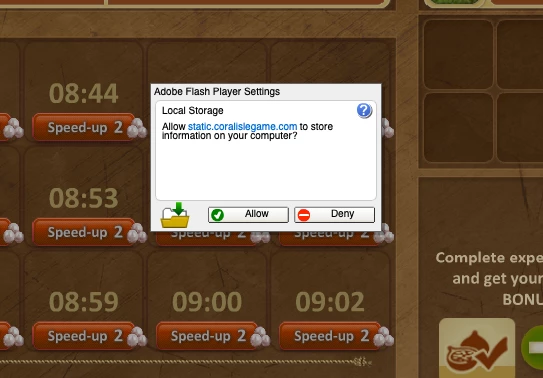
Very annoying pop up and I can't clear it

  • May 3, 2019
  • 1 reply
  • 205 views

For the past 2 days, I have had this pop up on one of my games. Even though I suspect it's phoney, it won't let me accept or deny it or x it out. I have uninstalled and reinstalled Flash Player. Here's a screen shot. This is a new Mac computer (Nov 18) running Mojave 10.14.4. Any help available? Thanks
    This topic has been closed for replies.

    1 reply

    jeromiec83223024
    Inspiring
    May 3, 2019

    Try going to Settings > Flash Player > Storage > Local Storage settings, and choosing Allow sites to save information on this computer

    That should prevent that dialog from popping in the first place, which is the easiest way to deal with it.