


Participant
November 30, 2015
Answered

What kind of business practice is this?

  • November 30, 2015
  • 1 reply
  • 207 views

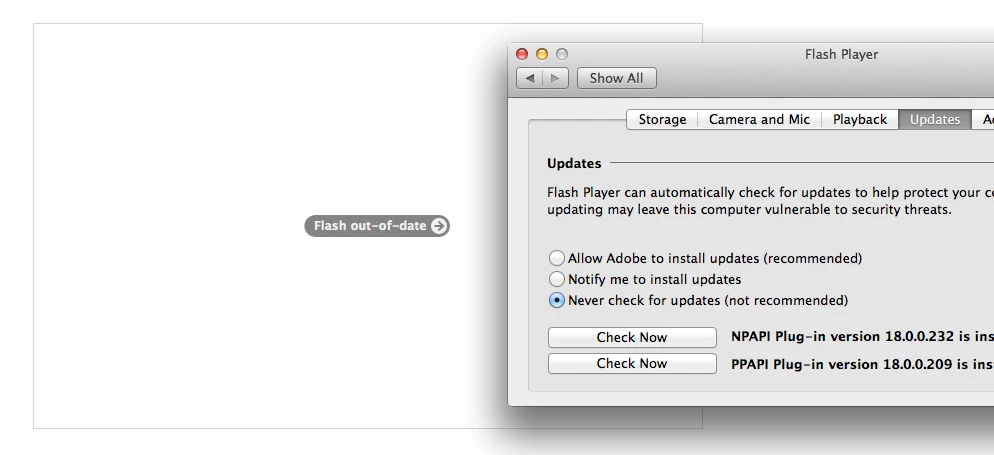
I do NOT wish to update my Flash player plugin. Why can't Adobe understand this? Please let me use my current plugin instead of blocking it for me. I am old enough to make that decision for myself - I do not need you to "protect" me by disabling something I was using. And how do you even know it's outdated if I told you to never check for an update!

What's even worse than the below is the issue that whenever I click "Never check for updates" - It always reverts back to "Notify me". It seems the only way to get rid of this is to uninstall the plugin altogether. Fantastic.
This topic has been closed for replies.
Correct answer _maria_

Hi,

Flash Player does not mark itself as out-of-date. The browser vendor that does that, usually when a 0-day security update is released.  Adobe has no control as to when a browser vendor marks a version of Flash Player out-of-date.

I am not aware of a situation where the update option randomly changes from what the user has selected.  Changes to the update option are recorded in the FlashPlayerInstallManager.log file, but it doesn't record who makes the change (e.g. installer at installation time, or user via the Preference Pane).  If you'd like to provide your install log file I can take a look at it to try to determine when it's changing.  The log file is saved at ~/Library/Logs.  You can upload it to cloud.acrobat.com using the instructions at How to share a document or using some other file sharing service of your choice and provide the link to the uploaded file.

--

Maria

1 reply

_maria_
_maria_Correct answer
Legend
December 1, 2015

Hi,

Flash Player does not mark itself as out-of-date. The browser vendor that does that, usually when a 0-day security update is released.  Adobe has no control as to when a browser vendor marks a version of Flash Player out-of-date.

I am not aware of a situation where the update option randomly changes from what the user has selected.  Changes to the update option are recorded in the FlashPlayerInstallManager.log file, but it doesn't record who makes the change (e.g. installer at installation time, or user via the Preference Pane).  If you'd like to provide your install log file I can take a look at it to try to determine when it's changing.  The log file is saved at ~/Library/Logs.  You can upload it to cloud.acrobat.com using the instructions at How to share a document or using some other file sharing service of your choice and provide the link to the uploaded file.

--

Maria