Participant
April 11, 2017
Answered

White screen at installation

  • April 11, 2017
  • 2 replies
  • 2391 views

Hello, when i try to install flashplayer the software (adobe download manager) remains white .... without there is anything happening.
The download seems to have been done.


Here is my configuration:
Windows 7 (service pack1) 64
graphics card ADM radeon r7 200
Pentium (r) Dual-core
3.00 GHz
(I think it's enough)


Thank you in advance for your help!

See you soon ! 😉

This topic has been closed for replies.
Correct answer _maria_

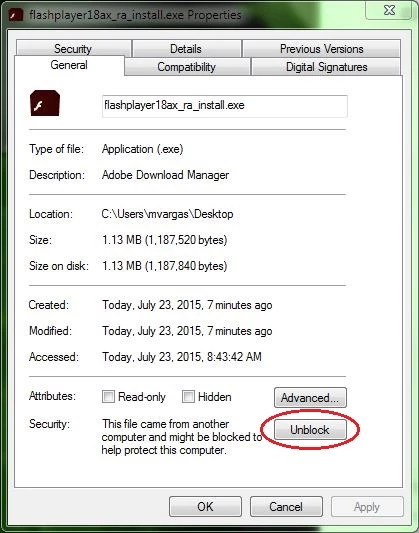
Please try the following:

  1. Right-click on the installer file and select Properties
  2. In the General tab click the Unblock button

  3. Click Apply
  4. Click OK to close the window
  5. Double-click on the installer file to launch the installer

2 replies

February 27, 2020

I have the same problem, and I followed the instructions by you but still I have the problem. Please let me know if there is any other way to solve this problem.


ps: I uninstalled and deleted all the previous flash player files.

_maria_
Community Manager
_maria_Community ManagerCorrect answer
Community Manager
April 11, 2017

Please try the following:

  1. Right-click on the installer file and select Properties
  2. In the General tab click the Unblock button

  3. Click Apply
  4. Click OK to close the window
  5. Double-click on the installer file to launch the installer
Participant
April 12, 2017

30/5000

It works, thank you very much ;-)

_maria_
Community Manager
Community Manager
April 12, 2017

you're welcome