



Why can't I install latest Flash Player ver 20 - Stuck in cycle of "Close IE"
I have tried to install the latest version of Flash Player Ver 20 (I guess, 20 is in the name of the download i.e. "flashplayer20ax_e_install.exe").
I have tried many times and methods of the actual install process. Such as:
1. Download and RUN immediately;
2. Download and Save AS and click on the saved module (mentioned above);
3. Download and Save As, and reboot to clean system and then click on the saved module (this time with IE executing at the moment);
4. Download and Save As, and reboot to clean system DO NOT execute IE before clicking on the saved module from before reboot (no IE executing at the moment;
PROBLEM: In all cases - when I get to the 50% point in the install process, usually the install will stop and display the following screen:
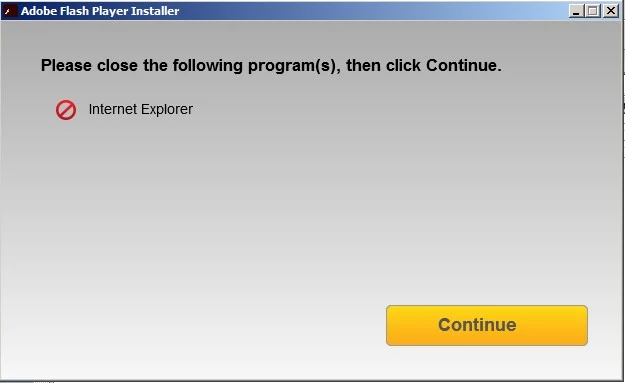
At this point - if IE is executing, I quit the IE program and all the processes / tabs on the window. I then press the Continue button and it does the EXACT SAME cycle again and stops at the 50% point and displays this window again.
1. I have tried several methods to continue from here, such as press Continue at the same point in the cycle each time;
2. Press the "X" in the upper corner of the window and exit the execution gracefully;
3. Rebooted and re-executed the process again;
But NOTHING CHANGES, Except I'm exaggerating here a bit, sorry - there have been a very small number of times when it DID Complete the install process (went past the 50% point)!!! BUT BUT and BUT...
These times were followed by the attempt to re-execute the same/normal process in IE which detected the need to update FLASH Player in the first place. In these cases they did not work either. The types of processes that detected the need for a new FLASH player have been like YouTube or Comcast DVR process.
There is some aspect of the install that is getting stuck on the belief that IE is important and a hindrance to the install. I don't see it. Before this problem, I've updated Flash Player many times, and have had no problems.
This problem started a few days before this post (on about 12/20/2015) and I've tried the install over and over in various ways and at various times of the day and before and after a reboot. Nothing has changed except for the occasional times when it would appear that the install worked, yet a test immediately after will fail saying that a new version of Flash is needed and then I go into the usual routines.
Current status of my computers are:
(I mention both because I have no trouble using my Laptop to execute the same process, for some unknown reason IE on my Laptop will not find a problem with the current flash player. BUT there is a difference in O/S, the Flash Version on the Laptop from the Desktop)
*******************************************************************************************
LAPTOP - Platform:
SAMSUNG Laptop with Windows 8.1 Home Premium 64 bit.
Processor is: Intel Core i7-5500U CPU @ 2.40GHz with 6.0 GB RAM memory.
Shockwave Flash Object: ver 18.0.0.194, File date: 06/19/2015 @ 8:02pm (different)
DESKTOP - Platform:
INTEL chipset in Assembled computer (BY ME) with Windows 7 Professional 64 bit.
Processor is: Intel Core i7-4770K CPU @ 3.50GHz with 8.0 GB RAM mem (7.86 usable?).
Browser is running version 11
Shockwave Flash Object: ver 20.0.0.228, File date: 12/25/2015 @ 4:11pm (different)
******************************************************************************************
In order to attempt to troubleshoot the problem myself, I used the troubleshooting process that was laid out on Adobe's own site before posting this comment, and I was not able to make it work.
I was instructed to determine if the FLASH player was installed or detected. The troubleshooting process showed that it was not installed or detected, BUT the ADDON Manger of IE showed that the Shockwave Flash object was ENABLED at the same time. I tried to DISABLE and Re-ENABLE and it did not make a difference. I even tried a new install during that process and it did not make any difference either!
I come to the point in my thinking that there must be something that has caused a dirtiness in the installation on my desktop computer so that it will hic-cup when it comes to the install. Is it possible that I will have to re-install the O/S (or refresh it) without having to completely re-install every last thing on the computer? Can that fix it?
QUESTION: Is it REALLY necessary for IE to be down before the install of FLASH Player can complete? That must be important to this overall issue so I would like to know. That question - What is the issue being detected by the install that is a problem?
Using the original software disc's I might be able to do a refresh of the O/S fairly easy then re-install all the O/S updates, but I would NOT LIKE to re-install every last piece of software for no good reason based on a comment or feeling that "hey that sounds like a neat thing to try now"! Please give me an answer that is based on sound understanding of the problem.
In closing, please understand that I worked in the mainframe computer environment for 30 years and have considerable skill in problem detection and analysis, and the evaluation of unusual occurrences and oddities. But when it comes to small computers, I'm lost when it comes to understanding the why's and wherefores of these processes. They make little sense to me sometimes. Have I given you enough to go on at this point - can you give me something to try? Do you have a way to force the install of the latest FLASH version just to see if that it will work once installed? It says that it is installed if you consider the tag information that is displayed when I double left-click on the shockwave name in the ADDON Manager. Something is not complete here!
Thanks for your help, I can't live with it in this state.
Roger.
 AdChoices