
trinity_r
Participating Frequently
August 22, 2012
Question

Why do I continue to receive update notices while using a mms.cfg that disables auto update?

  • August 22, 2012
  • 2 replies
  • 1511 views

My Flash Player Settings panel looks like this:
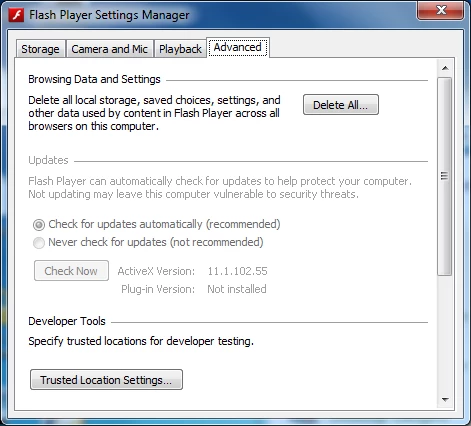
Mms.cfg contains: (encoded w/ UTF-8)

AutoUpdateDisable=1
AutoUpdateInterval=0
SilentAutoUpdateEnable=0

Explain to me why users are now receiving prompts that there is a flash update available?  Our users do not have local administrator and updates cannot be installed by the user.

This topic has been closed for replies.

2 replies

chris.campbell
Legend
August 23, 2012

The mms.cfg settings should disable the update notification, though your setting of

AutoUpdateInterval=0

tells Flash Player to check for updates every time it starts.  However, this should be overridden by AutoUpdateDisable=1.  Can you double check the location of the mms.cfg file on an effected system?  Could send me a copy (ccampbel@adobe.com) and let me know what OS/browser combination is being used?

Thanks,
Chris

trinity_r
trinity_rAuthor
Participating Frequently
August 24, 2012

The OS, Flash version(s), and file locations are as follows:

     Windows 7 x64

     Internet Explorer 9

          Flash Player 11.1.102.55 - 32-bit Active X

               C:\Windows\System32\Macromed\Flash\mms.cfg

          Flash Player 11.1.102.55 - 64-bit Active X

               C:\Windows\SysWOW64\Macromed\Flash\mms.cfg

So far I can recreate the scenario easily.  Initially, after installing Flash (via SCCM) I don't have updates disabled.  After I deploy the mms.cfg to a system, I restart.  After the restart the user is prompted to install the latest Flash update.  I saw this consistently on 26 machines yesterday.

Detailed version levels sent via email

chris.campbell
Legend
August 24, 2012

Thank you.  Replied by email with a request for your mms.cfg file.

pwillener
Legend
August 23, 2012

Not sure, but I believe this old Flash Player version (11.1) may not use the mmf.cfg settings, but the Flash Player Settings Panel (which is set to check for updates).

Install or deploy the latest Flash Player, and it should use the mmf.cfg setting.