Answered
Why is adobe running twice?
as you can see adobe is running twice? why??
I have windows 7 32bit, latest version of firefox and adobe

as you can see adobe is running twice? why??
I have windows 7 32bit, latest version of firefox and adobe
I have the same thing happening. Today my pc became noticeably slow (even logging into windows usually takes about 5 seconds, today it takes almost a min). I have ran virus and malware scans and found nothing. I checked processes to see if there is anything unusual and found nothing except this. And when I re-entered task manager both processes were gone.
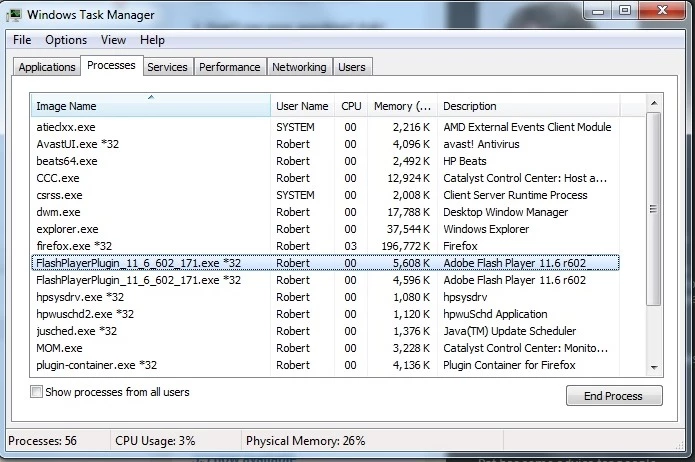
This is expected and normal behavior. When running Flash Player in Firefox with protected mode enabled, you will see two instances in the task manager. This, in itself, should not cause any system or browser slowdown or performance issues.
Thanks,
Chris
Already have an account? Login
Enter your E-mail address. We'll send you an e-mail with instructions to reset your password.
 AdChoices