
January 29, 2015
Answered

Why not updated Adobe Flash Player for Google Chrome up to version 16 .0. 0. 296?

  • January 29, 2015
  • 1 reply
  • 677 views

Hello, me why not updated Adobe Flash Player

for Google Chrome: 16. 0. 0. 280,

and for Mozilla Firefox and Internet Explorer

Adobe Flash Player has been updated up to version: 16.0.0. 296.

I will be glad of your help.
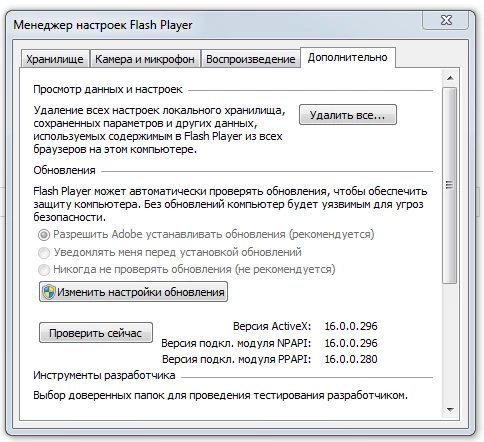
Здравствуйте, у меня почему не обновляется Adobe Flash Player

для Google Chrome: 16. 0. 0. 280,

и Mozilla Firefox и Internet Explorer

Adobe Flash Player был обновлен до версии: 16.0.0. 296.

Я буду рад вашей помощи.

This topic has been closed for replies.
Correct answer _maria_

Hello,

The PPAPI plugin version 16.0.0.280 is a beta version, it is not a release version.  In order to install a release version you'll first need to uninstall the beta version and then install the release version.

To uninstall ONLY the PPAPI plugin do the following:

  1. Go to Control Panel > Programs and Features
  2. Locate the PPAPI plugin (Adobe Flash Player 16 PPAPI)
  3. Select the item and then select to uninstall

To install the release PPAPI plugin do the following:

  1. Using any browser, go to http://get.adobe.com/flashplayer/otherversions
  2. In step 1 select the operating system you are using
  3. In step 2 select 'Flash Player 16 for Opera and Chromium - PPAPI'
  4. Select whether or not you want the additional offer
  5. Click Download Now to download the online installer.

--

Maria

1 reply

_maria_
Community Manager
_maria_Community ManagerCorrect answer
Community Manager
January 29, 2015

Hello,

The PPAPI plugin version 16.0.0.280 is a beta version, it is not a release version.  In order to install a release version you'll first need to uninstall the beta version and then install the release version.

To uninstall ONLY the PPAPI plugin do the following:

  1. Go to Control Panel > Programs and Features
  2. Locate the PPAPI plugin (Adobe Flash Player 16 PPAPI)
  3. Select the item and then select to uninstall

To install the release PPAPI plugin do the following:

  1. Using any browser, go to http://get.adobe.com/flashplayer/otherversions
  2. In step 1 select the operating system you are using
  3. In step 2 select 'Flash Player 16 for Opera and Chromium - PPAPI'
  4. Select whether or not you want the additional offer
  5. Click Download Now to download the online installer.

--

Maria

January 30, 2015

Dear Maria, hello.

I am very grateful for the help.

All turned out!!! ))) Thank You!!!

Sincerely, Rem.

Уважаемая Мария, здравствуйте.

Я очень благодарен за помощь.

Все получилось !!! ))) Спасибо !!!

С уважением, Рем.