


Participant
March 22, 2013
Question

Why won't YouTube embedded video play from PowerPoint?

  • March 22, 2013
  • 14 replies
  • 77172 views

I have followed the normal process to embed video in PowerPoint 2010 (32 bit), and playback worked without issues a couple of months ago.  Now it does not.  I have completed all of the troubleshooting tips, and reinstalled latest FlashPlayer 32-bit, etc.  When I go to play the embedded video in PPT, the following message appears:

"To play the selected item, you must install a later version of the Adobe Flash Player. To download the Adobe Flash Player, go to the Adobe website."
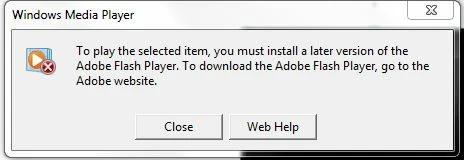
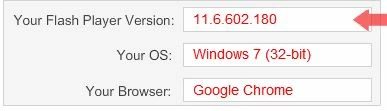

There does not appear to be any settings changed in browser (IE / Chrome), Windows Media Player, or PowerPoint.

Need a solution.

    This topic has been closed for replies.

    14 replies

    kandym33747408
    Participant
    April 18, 2016

    You may also try this method to embed and play YouTube videos or music in PowerPoint

    I just have a try, and find it really works great in insert YouTube video or audio to PPT to successfully play YouTube video or audio in PowerPoint

    C_F_McBlob
    Inspiring
    August 5, 2013

    TVC is good stuff. I've used it for about three years now.

    Participating Frequently
    August 5, 2013

    It should be noted that using any program to download a video is against the ToS of YouTube.

    "Content is provided to you AS IS. You may access Content for your information and personal use solely as intended through the provided functionality of the Service and as permitted under these Terms of Service. You shall not download any Content unless you see a “download” or similar link displayed by YouTube on the Service for that Content."

    I understand why this solution was brought up...but if you are doing this for your "place of employment"...I would be careful.

    Participant
    August 2, 2013

    In order to avoid this error, a recommended solution is to embed  downloaded YouTube video in PowerPoint.

    I just find a professional YouTube to PowerPoint Converter and a step by step guide on how to  download and convert YouTube to PowerPoint supported format to  successfully embed YouTube in PowerPoint for easy playback.

    Participant
    June 29, 2013

    Hi All,

    I've been trying all the suggested changes here and nothing seems to work. "version=3", doesn't work, "version=2" doesn't work, and deleting it doesn't work either. I'm using PowerPoint 2013 and have captured embed code using both Firefox and Explorer. Nothing seems to make a difference.

    Why is this changed? Who is responsible - Google, Microsoft, or Adobe? I can't think of a reason why anyone would want to stop people embedding YouTube videos into PowerPoint, so I'm assuming that this problem is the unintended consequence a "fix" or "update".

    Frustrated!

    July 1, 2013

    Don't know who is responsible but the current situation seems to be

    2010 Changing to Version=2 works

    2013 Nothing works except using the old insert a flash player object

    (http://www.pptalchemy.co.uk/YouTube.html)

    Participant
    July 24, 2013

    Win 7 Office 2013 (local install not 365) NOTHING is working now. Not the old school Developer embed; not Version=2; not deleting &ampVersion=3; and not any of these combinations whilst adding the often missing http: to the two URLs in the embed code. Nothing. I spent hours fixing old code (re-embedding) in April when the Version=2 fix worked. Now it's stopped. OLDER stuff without the fix is now working, but no new embed is working. C'mon Adobe, MS and Google! WTF? We pay good money for this stuff coz we need to work. Why can't this be fixed?!?!?!?

    Participant
    June 27, 2013

    Modifying the code from version=3 to version=2 in the two spots resolved the issue for us. I assume it is because when you remove the 'version=X' code altogether it defaults to the latest version anyway (which is 3?). Thanks for the trial-and-error tip !

    Participating Frequently
    June 11, 2013

    If you get stuck on the whole "embed" thing, you can use the developer tab option sited above. It doesn't rely on the embed code, it only looks for the URL or web address of the YouTube video and inserts it.

    Participant
    June 6, 2013

    Changing to version2 worked for me on different computers and browsers.  Thanks

    Participating Frequently
    June 3, 2013

    It does.

    The only drawback is that it will not auto-play...gotta click to play it in the PPT

    Participating Frequently
    June 3, 2013

    Not sure if links are allowed, but this site had some instructions. The only real diffrence is how you get the developer tab to show.

    http://goanimate.com/video-maker-tips/how-to-add-video-to-powerpoint-presentations/

    Participant
    June 4, 2013

    Removing version=3  is no longer working. U should change version=3 in both places into version=2

    After that it start working again!

    Participating Frequently
    June 3, 2013

    I always found that step 4 could happen by putting a checkbox in the Developer spot on the right, but as long as you get the tab.

    There are lots of walkthroughs on how to insert Youtube from Developer tab from the 2007 days, so I won't add more here unless needed.

    Participating Frequently
    June 3, 2013

    Do you know if this method still works for 2010 to insert youtube clips?

    Participating Frequently
    June 3, 2013

    This was one of the features that Powerpoint 2010 offered. The Delevoper Tab way works...BUT that wasn't what was boasted.

    Now that Microsoft has Office 2013 and Office 356, I wonder if they will look into a fix for all 3? I wonder if 2013 has this feature and/or problem? I will bet they don't care if Youtube works, as Bing videos probably will.

    boneclod
    Participant
    June 3, 2013

    I actually tried this in Outlook 2013 as well and received the same error.