


Win10 IE11 flash doesn't crop
Hello everyone!
I hope I am in the right place to ask for help.
I am using verysoft webcamsplitter which broadcasts 4:3 and 16:9 at the same time. I chose 1280x720 as default camera resolution.
When a site asks for 640x480(or 4:3 ratio) this happens:
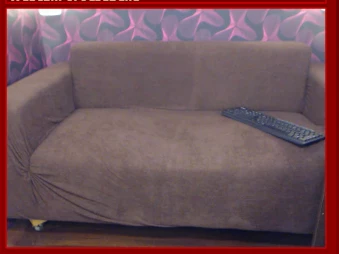
A) in all browsers on windows 7 and all except IE11 on windows 10, it eliminates the side parts (crops) and scales down to 640x480 giving a proper aspect ratio image.
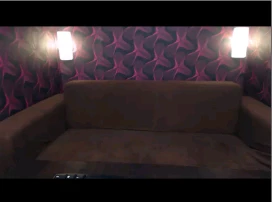
B) on windows 10, IE11, it inserts horizontal black bands on top and bottom, keeping the image wide.
I need the A behavior to work on B option, on windows 10 and IE11. Any suggestions?
I need to upgrade from win7 to win10 due to the stability of IE11. In win7 it crashes, it doesn't get updates anymore.
PS: I've copied the activex flash files from windows7 and it crops great on some sites, but other sites will not show flash content anymore, even though I hear the sounds in the flash as it should, it works but it doesn't show anything. I wonder if I can rename chrome's flash files from dll to ocx and try again.
Inserted 2 pictures.
This is image on situation A. Image is wide but cropped to fit the 4:3 needed.
And this is image on situation B. IE11 maintains wide image but inserts black content to make it 4:3 .
 AdChoices