
Participant
January 7, 2012
Question

windows 7 chrome doesn't work with flash

  • January 7, 2012
  • 3 replies
  • 5949 views

i have a windows 7 x64 with the latest version of chrome as it's default browser. i also have IE running with flash too. however, while flash works on IE, it doesn't work on chrome. i understand that to allow flash to work on chrome, you can access the global settings on the website, but i have this program running on my computer that needs flash to work and whenever i try to open it, this pops up:
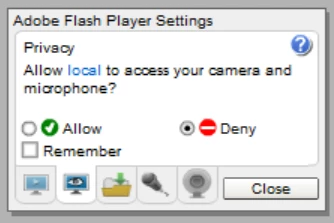
i can't click the allow, remember or close buttons. i can access global settings, but considering how this is just a program and not a website i don't think how helpful that'd be. can someone please help me?!

This topic has been closed for replies.

3 replies

July 13, 2012

Flash stopped working on all my browsers (Windows Vista7 (32 bit).  I went through all of the steps offered on all of the forums including this one and still nothing worked.  I found a forum that said that deinstalling Real Player may work.  I did that and both Firefox and Internet Explorer started playing videos again, but Chrome continued to crash Flash on every webpage I went to.  I went back through the steps and when I diasbled the Flash plugins in Chrome that had 'apps' in their string - Chrome started again playing videos.  This has been a 3 week pain of reinstalling the browsers, deinstalling and reinstalling Flash, Shockwave and restarting the system numerous times.  It looks like Real Player was the main culprit and the clashing Chrome Flash Shockwave plugins (3 of them) were secondary.  I'm up!

January 8, 2012

mzhu2626 wrote:

i have a windows 7 x64 with the latest version of chrome as it's default browser. i also have IE running with flash too. however, while flash works on IE, it doesn't work on chrome. i understand that to allow flash to work on chrome, you can access the global settings on the website, but i have this program running on my computer that needs flash to work and whenever i try to open it, this pops up:

i can't click the allow, remember or close buttons. i can access global settings, but considering how this is just a program and not a website i don't think how helpful that'd be. can someone please help me?!

See the "Known Issues" article re: Google Chrome to see if you recognize any of them: http://support.google.com/chrome/bin/static.py?hl=en&page=known_issues.cs

There's a link to their Help forums near the foot of the page.

Participating Frequently
January 7, 2012
mzhu2626Author
Participant
January 7, 2012

i need help accessing flash thru a program on my computer, NOT a website

Participating Frequently
January 7, 2012

Google embeds Flash Player into Chrome.  Talk to Google if Flash Player is not working on Chrome.