


Zooming/scaling in hosted Flash Player control
Hello,
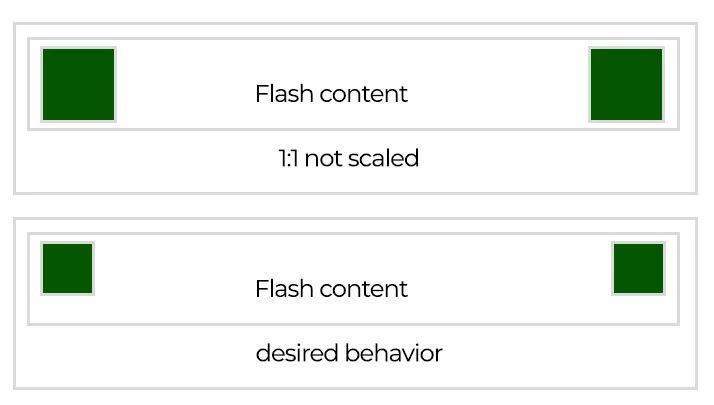
I am trying to replicate Flash content zooming/scaling behavior in my app as seen in Internet Explorer. Googled all day to no avail. Flash content contains some "constantly displayed" elements (think of it as game's HUD). IE, when we set its zoom to, say, 75% scales down these elements, like using ActiveX control directly on HiDPI display. Player's frame size stays unchanged. Movie is embedded with "scale=noscale", which should produce desired behavior as per doc. Calling Zoom on hosted ActiveX indeed scales down the content but HUD is scaled as well and does not retain its position, which is not desired. I also tried to host Flash Player inside MS WebBrowser control (IE engine) and calling ExecWB with OLECMDID_OPTICAL_ZOOM with no success. Everything else on the page zooms correctly, but Flash renders its contents 1:1. To be more funny, I ran the same movie, using the same HTML in IE and it gave desired behavior. So either I am doing something wrong or WebBrowser control does not pass something to Flash or Flash itself misses something.
To visualize things, I made a mock-up. Green squares are HUD that need to be scaled and need to retain their position. Outermost rectangle is entire page layout bound. In 1st we see Flash content rendered at 1:1 AND when using WebBrowser control which is set to < 100% zoom (ie no change in rendering despite of <100% zoom set at WB control). Next we see how IE performs such scaling - Flash content frame size is the same, but green squares are scaled and retain their positions.
So to sum it up: how to acheve desired behavior using either ActiveX control directly or via WebBrowser control? Thanks in advance.
Software: IE 11, FP 32 on Win10.
 AdChoices