
Known Participant
November 9, 2010
Answered

Bi-Directional text - issue

  • November 9, 2010
  • 1 reply
  • 630 views

Hi,

I try to display this text (TextEdit screenshot) in FLASH CS5.

This is a screenshot of the FLASH CS5 IDE:
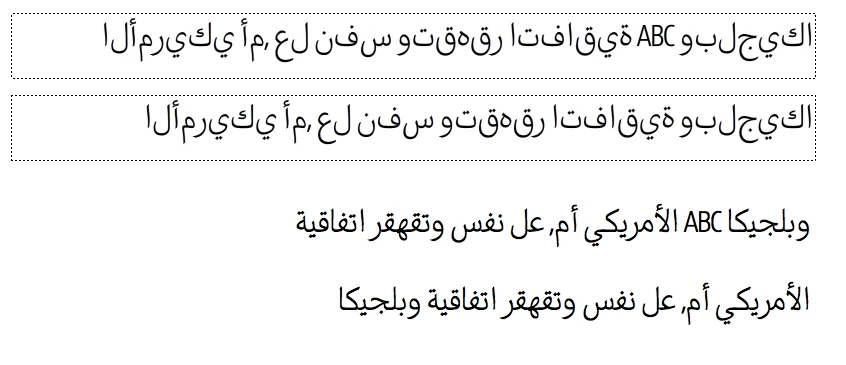
Line 1: Classic TextField incl. roman letters "ABC"

Line 2:  Classic TextField, arabic only

Line 3: TLFTextField incl. roman letters "ABC"

Line 4: TLFTextField, arabic only

Line3: the words are in wrong order.

Line4: right order, nice rendering, but no "ABC" 

Short question: How do I display the text within a TLFTextfield exactly as apearing in TextEdit?

THANKS!

This topic has been closed for replies.
Correct answer

Is your writing direction set to Right to Left? In the Flash CS5 UI, you open the palette menu for Properties and select "Show Right-to-Left Options" then at the bottom of the Paragraph section you can set Direction to Right to Left.

1 reply

Correct answer
November 9, 2010

Is your writing direction set to Right to Left? In the Flash CS5 UI, you open the palette menu for Properties and select "Show Right-to-Left Options" then at the bottom of the Paragraph section you can set Direction to Right to Left.

Known Participant
November 10, 2010

Nice one, thx.

... and dont forget to set the alignment to "Align to start" to get it working for multiple line textfields.