
February 8, 2011
Question

Building libraries and samples....this can't be right, is it?

  • February 8, 2011
  • 1 reply
  • 2900 views

I realize that I can simply check out built SWC files from here, but this doesn't help me build the samples. I feel like I've missed some corner of the documentation, because my procedure for building Cairngorm 3 libraries and samples seems like it can't possibly be right.

I've tried creating a new workspace and checking out the entire contents of this repository into it:

http://opensource.adobe.com/svn/opensource/cairngorm3/trunk/libraries

That seems to succeed, although I get errors like this every time:
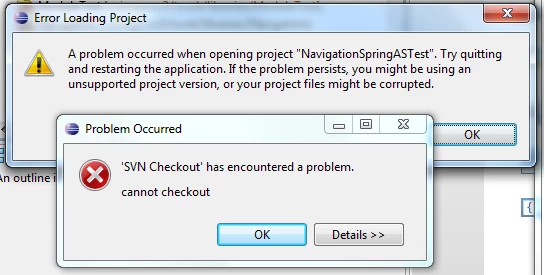
The resulting projects don't build because of this error:

configuration variable 'compiler.library-path' value contains unknown token 'M2_REPO'    ContractTest        Unknown    Flex Problem

I've fixed that problem by getting http://opensource.adobe.com/svn/opensource/cairngorm3/maven-repository to my C:\Program Files (x86)\Adobe\Adobe Flash Builder 4 Plug-in folder and setting M2_REPO in my workspace's Linked Resources to point to that.

Having done all that, everything seems to build except for IntegrationDMS and IntegrationTest.

Is this the right way to do it, or is there a simpler way?

Thanks!

This topic has been closed for replies.

1 reply

ledroff
Adobe Employee
Adobe Employee
February 8, 2011

As you know by now Cairngorm3 build is leveraging maven and flex-mojos.
To ease the developper workflow, to make things more consistent, to lower the maintenance cost, we decided :
* to stop copying the dependencies in the flashbuilder projects libs folder
* to leveraged the maven repository in the eclipse/flasbuilder projects configurations.

Furthermore, to avoid hard coded path and allow proper sharing of these flasbuilder configurations files, we use linked-resources when appropriate.
M2_REPO is used as such: it is the root of your maven repository.

As for IntegrationDMS it offers some "flex plumbing" to ease the integration with Adobe LCDS (http://www.adobe.com/products/livecycle/dataservices/) especially its Data Management features, hence its name.

In order to build it from the source you need to compile it against 3 SWCs provided in Adobe LCDS. As found in the build file

        <!-- lcds dependencies  -->
        <dependency>
            <groupId>com.adobe.lcds</groupId>
            <artifactId>fds_rb</artifactId>
            <version>${lcds.version}</version>
            <type>rb.swc</type>
            <classifier>en_US</classifier>
            <scope>external</scope>
        </dependency>
        <dependency>
            <groupId>com.adobe.lcds</groupId>
            <artifactId>fds</artifactId>
            <version>${lcds.version}</version>
            <type>swc</type>
            <scope>external</scope>
        </dependency>
        <dependency>
            <groupId>com.adobe.lcds</groupId>
            <artifactId>playerfds</artifactId>
            <version>${lcds.version}</version>
            <type>swc</type>
            <scope>external</scope>
        </dependency>
        <!-- eof lcds dependencies  -->

Adobe LCDS is not opensource, as a consequence we can not host its artifacts in our repository.

If you want to build Cairngorm3 from the source, you may then either comment out IntegrationDMS from the parent library build or install these artifacts into your own private repo.(currently the version of lcds we build against is 3.1.0.273931) :


mvn install:install-file -DgroupId=com.adobe.lcds -DartifactId=fds -Dversion=3.1.0.273931 -Dpackaging=swc -Dfile=<lcds-on-your-disk>/fds.swc
mvn install:install-file -DgroupId=com.adobe.lcds -DartifactId=playerfds -Dversion=3.1.0.273931 -Dpackaging=swc -Dfile=<lcds-on-your-disk>/playerfds.swc
mvn install:install-file -DgroupId=com.adobe.lcds -DartifactId=fds_rb -Dversion=3.1.0.273931 -Dclassifier=en_US -Dpackaging=swc -Dfile=<lcds-on-your-disk>/fds_rb.swc

Please note also that if you need to build cairngorm3 from maven, as mentioned in the flexmojos docs, there is one JAR (AIR development tools) that is packaged with the Flex SDK but is not open source.
Because of this, flexMojos cannot host this artifact. To build from source, you will need to install this artifact into your own private repo:
>mvn install:install-file -DgroupId=com.adobe.flex -DartifactId=adt -Dversion=<version-of-the-sdk> -Dpackaging=jar -Dfile=adt.jar

This JAR is bundled with the Flex SDK, which is freely available from : http://opensource.adobe.com/wiki/display/flexsdk/Downloads

I'll do my best to update the wiki doc with this asap.