
Participating Frequently
April 13, 2009
Answered

Discarding the last TextLine and trying again with a new width

  • April 13, 2009
  • 1 reply
  • 873 views

Hi all,

I'm using TextBlock to create a paragraph.   This paragraph has regions which do not render any text (so that I could put some images down within the generated text in a way more similiar to CSS float styles.  BTW, I'm not trying to achieve an inline image rendering; I know that is possble already with TextBlock).

So, my problem:

If one of these 'block out' regions are close to the boundary of the overall paragraph region, then this is the result:
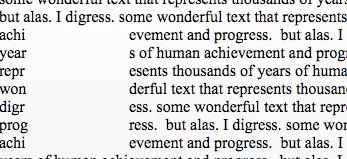
In the left column, because those words are not broken on natural word breaks, createTextLine results in TextLineCreationResult.EMERGENCY.

That's great--I can detect this situation from the API.   However, I can't figure out what to do once I'm aware of it!

What I want to do is this:  I want to throw away any EMERGENCY TextLine (I've tried releaseLines), and then  'rewind' one createTextLine attempt so that I can try to generate the next TextLine using the same context as before the EMERGENCY failed attempt.

For clarity, this would mean in the above image, I'd hope to just discard the 'achi', 'year', 'repr', 'won', 'digr', 'prog', 'achi' TextLines on that thin left column... meaning only whitespace would occur in that thin column.   On the first line of the right of that skipped block, you'd see 'achievement' on the first broken line, because the 'achi' would be considered during the next createTextLine() attempt.

Regards,

Seth

This topic has been closed for replies.
Correct answer robin_briggs

Sorry! Many of us are on vacation this week, which is why answers are slow. What I would suggest is that when you get a line break back that indicates emergency line breaking, you rebreak that line, giving it the offset and width adjusted so that it falls to the right of where it would otherwise fall. So, that might look something like this:

     var textLine:TextLine = textBlock.createTextLine (previousLine, 40, 0);

     if (textBlock.textLineCreationResult == TextLineCreationResult.EMERGENCY)

          textLine = textBlock.createTextLine(previousLine, 300, 80);

In other words, you just rebreak the original line in place, giving it a larger width.

I hope I'm not misunderstanding the question. Please let me know if this doesn't answer it.

- robin

1 reply

Participating Frequently
April 15, 2009

Hey all,

Do I need to clarify the question?  Either way, thanks for any help!

Regards,

Seth

robin_briggsCorrect answer
Adobe Employee
April 16, 2009

Sorry! Many of us are on vacation this week, which is why answers are slow. What I would suggest is that when you get a line break back that indicates emergency line breaking, you rebreak that line, giving it the offset and width adjusted so that it falls to the right of where it would otherwise fall. So, that might look something like this:

     var textLine:TextLine = textBlock.createTextLine (previousLine, 40, 0);

     if (textBlock.textLineCreationResult == TextLineCreationResult.EMERGENCY)

          textLine = textBlock.createTextLine(previousLine, 300, 80);

In other words, you just rebreak the original line in place, giving it a larger width.

I hope I'm not misunderstanding the question. Please let me know if this doesn't answer it.

- robin

Participating Frequently
April 16, 2009

Hi Robin,

So, that's exactly what I was trying to do, or so I thought.  Your example forced me to look at my code harder... here's the moral of the story.  The structure of my code processing the TextLines was like so:


if

{

     // attempt create textLine

}

else if (condition = emergency)

{

     // discard line, don't set previous

}

else (textLine != null)

{

     // keep line, place it on stage, and set previousLine to the newly created one

}

Notice the oddity... I put a condition on the else statement!  Putting a condition on an else statement causes to behave like an else/if (so I just learned).  I had done some refactoring and left the condition on the else statement by accident, so both the else if and else statement were executing!!  This caused  my emergency block to be 'persisted' into the textblock instead of discarded.

Thanks for your help Robin,

Seth