


Participant
November 13, 2012
Question

Flex 3: ColorPicker Customization

  • November 13, 2012
  • 1 reply
  • 1996 views

Hi,

I am using a ColorPicker control in Flex 3.6 project, and I want to customize it like this:
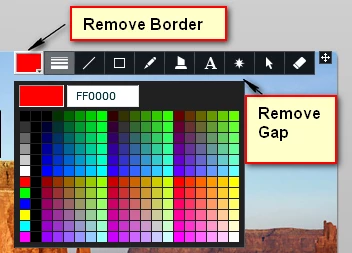
Basically removing the border from the ColorPicker selector button and reducing the gap size between the selector and swatch pallete to zero.

Is that possible at all?

I've searched all the attributes and styles of the ColorPicker w/o success...

Many thanks!

Ofer

This topic has been closed for replies.

1 reply

Vikram_S
Known Participant
December 5, 2012

Hello,

I am not sure if this works with 3.6, but in my 4.0 I have done like this.

  1. Add style (.css) to your project.
  2. Create PNG files as you want to show that color picker.
  3. Add follwing code to css file

.pickerSkin{

          up-skin: Embed(source='assets/icons/color-normal.png');

          down-skin: Embed(source='assets/icons/color-down.png');

          disabled-skin: Embed(source='assets/icons/color-disable.png');

          over-skin: Embed(source='assets/icons/color-over.png');

}

finaly add pickerSkin style name to that color picker.

I am not sure you can reduce that space.

Thanks,

Vikram

Vikram_S
Known Participant
December 5, 2012

Make sure that some image part should be transparent to show the selected color.

Ofer BarAuthor
Participant
December 5, 2012

Thank you very much Vikram!

I will try that and post back about the results.

Ofer