
Participating Frequently
July 19, 2010
Question

Flex 4 Spark controls text not displaying correctly on Solaris 10

  • July 19, 2010
  • 1 reply
  • 1087 views

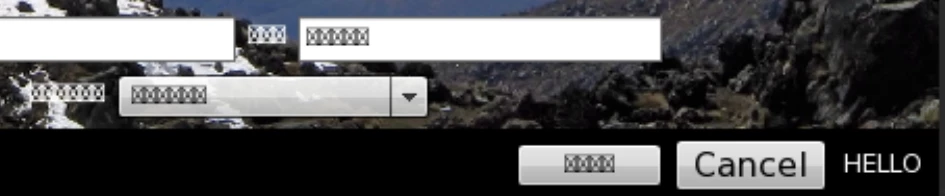
For some reason Spark controls won't render text correctly on our sparc Solaris 10 worstation.  As you can see the Cancel button and the "HELLO" label are mx controls.  The rest are spark controls and only display a square with an x inside, Any ideas?

I've tried with both "_sans" and "_typewriter" font families.
This topic has been closed for replies.

1 reply

Adobe Employee
July 20, 2010

This looks like what happens when Flash Player cannot find a font on the system that has the glyph necessary to draw the Unicode character. Can you tell me what text is supposed to be displaying there?

Thanks,

- robin

jmandawgAuthor
Participating Frequently
July 20, 2010

It's supposed to look like this:

I'm not using unicode at all.  I initially tried to use the default font (not specifying any)  Then i tried using the device fonts "_sans" and "_typewriter" but i get the same problem.  It works fine on windows.  The weird thing is it only happens on Solaris 10 and only on Spark controls.  I am using Flash Player 10r45_2 if that makes any difference.

Adobe Employee
July 20, 2010

Unfortunately the folks who would know most about Solaris are out this week. I am trying to get you answers, though. I did receive this one suggestion for getting more information to aid in a diagnosis. Can you try this:

fc-match "sans-serif"

and

fc-match "monospace"

And tell us what you get?

fc-match is a program for analyzing the font configuration.

Thanks!

- robin