
Participant
July 21, 2009
Answered

Help with TLF application and few questions

  • July 21, 2009
  • 1 reply
  • 3425 views

Hi guys,

I'm a newbie with TLF trying to creating a desktop based gadget for contacts management using TLF. Contacts are received from a server.

TLF is used for displaying contacts.


I have encountered few problems . So i needed some help.
My layout is as follows
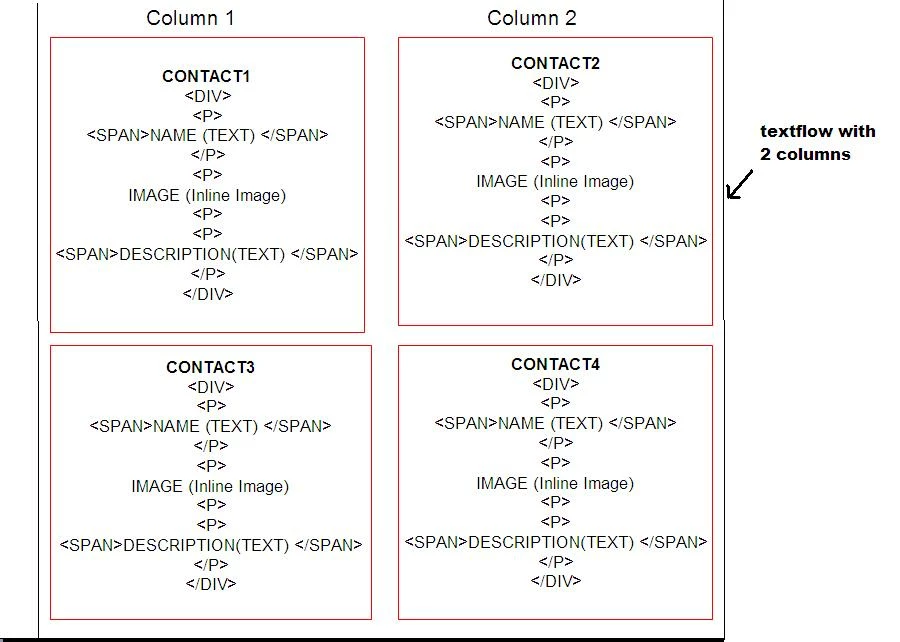
Textflow container size is 700 X 600
Each contact has the following structure

Each <Div> holds data of one contact.

PSEDO MARKUP XML is like.. (but i have not used the xml..i  have created this in through code using Div element,paragraph element

and span elements etc)


             <DIV>
                      <P>
                        <SPAN>USER NAME (TEXT) </SPAN>
                     </P>
                     <P>
                            IMAGE (Inline Image)
                     <P>
                     <P>
                            <SPAN>USER DESCRIPTION(TEXT) </SPAN>
                    </P>
            </DIV>
Column layout is 2

Ideally i want to show 4(can vary) contacts at a time..please see image.

I have added the contacts to Textflow and set the container size to 700 X 600 and coulmns to 2.

Problem:
Sometimes when i try to fill contact details  eg : if USER DESCRIPTION is too large, the text overflows
from 2nd column,and it gets overlaps with the first contact in first column
example in image link if 4th contact description data is very large. 
whenever dynamic text is larger,text flows.

Also i dont want to use an individual textflow for an contact as it will be difficult to manage?
(or would it be easier??)
Ideally a single flow holds multiple contacts is needed.

Questions:

1] How do i avoid the overflow?
    Is there a way to know if the textflow is full with text or is going to overflow ?
    Even if i can know if the next contact's data is going to overflow,i can put it on to next page

2] Is the way to select individual <DIV> elements .programatically. ie: traverse the textflow.
    I want to be able to search contacts based on it. Username and user description
    So i want to iterate each div  and go thr the <P>/<SPAN> nodes of username and userdescription and search text in it.

3] Also i want to be able to draw a border around each <DIV> element ..thin red border.

I have been refering the columns example.

Please help .

Thanks in advance.

Amit

This topic has been closed for replies.
Correct answer Abhi.G.

Thanks a lot for helping

Yep it didn't require two controller..it was a fault in the code.(Line 17 in above code)

I think the overlap part is resolved now thanks to your advice. i will make changes to code accordingly

Just curious, is there a way to know how much text (characters the text overflowed by? or overflow string?) after composition?

Can i also get the answer to Point (2)[how to iterate through Textflow for each contact div and paragraph] and

Point (3) [Bordering to each div element]

Also i want to add a button (group of buttons actually) type of thing to each contact, for various operations for each contact

(remove,edit,move etc),is that type of operation possible in TLF ?

Having button of tlf elements/containers?

Sorry for asking it in the same question but i didn't want to create new discussion.

Thanks in advance

Amit


Look at ContainerController.textLength; this gives you the number of characters composed in that container. Add this value for each controller, subtract from textFlow.length


To get the first paragraph, try textFlow.getFirstLeaf().getParagraph(). Then call getNextParagraph() to get successive ones. There is no equivalent for DivElements so you will have to traverse the flow hierarchy (recursive calls to FlowGroupElement.getChildAt) and use the 'is' operator to check if a child is a DivElement.

Borders for flow elements are not natively supported by TLF. You will have to draw them on the container after figuring out the positions of the lines corresponding to the composed element. BTW, have you looked at the Flex Gumbo Text components like TextArea which are build on top of TLF and are skinnable so you can readily specify styles like borders?

1 reply

Adobe Employee
July 22, 2009

There is no break element in TLF at this time so controlling the container size so that each contact is in exactly one container without flowing into the next one is going to be difficult

I think you should make each contact into a separate TextFlow with it's own container.   So in your example there would be 4 TextFlows with 4 containers.

Hope that helps,

Richard

amit42Author
Participant
July 22, 2009

Thanks for the  quick reply.

i will try the option of 4 containers.

Still i think it would be better if  i will show you guys what exactly is going wrong.

This a slightly modified version of columns example from TLF examples.

I'm using flex builder 3.2 and slightly older version of TLF :  textlayout_framework_p1_111808

tlf overlap.JPG

Here the code sample i modified to

i have attached the same file.

To simulate overflow and overlap i called addFlow() 6-7 times..calling it 4 or less times does cause overflow .

So i wanted to know is there a way to know if the text i'm going add will cause a overlap??

Or Is there a way to possibly avoid adding text to TLF if required text is going to cause overflow?

or possible checking remaining height of TLF before adding?

i just want to know the the text wiill overflow so i can shift that text to next canvas or textflow.

private var mainFlow:TextFlow;
            private var mainSelectionManager:SelectionManager;
            private var containerFormat:ContainerFormat;
            private var paragraphFormat:ParagraphFormat;
            private var paragraphElement:ParagraphElement;
            private var characterFormat:CharacterFormat;
                       
            private var sectionController:DisplayObjectContainerController;

            function initText():void
            {
                var mainSprite:Sprite=new Sprite();
                mainSprite.x=30;
                mainSprite.y=100;
                canvas.rawChildren.addChild(mainSprite);
                mainSelectionManager=new SelectionManager();
                mainFlow=new TextFlow();
                mainFlow.interactionManager=mainSelectionManager;
                mainFlow.flowComposer.addController(new DisplayObjectContainerController(mainSprite));
                sectionController=new DisplayObjectContainerController(mainSprite);
                sectionController.horizontalScrollPolicy=ScrollPolicy.OFF;
                sectionController.verticalScrollPolicy=ScrollPolicy.OFF;
                mainFlow.flowComposer.addController(sectionController);
                mainFlow.flowComposer.getControllerAt(0).setCompositionSize(427, 500);
                mainFlow.addEventListener(StatusChangeEvent.INLINE_GRAPHIC_STATUS_CHANGED, picLoaded);
                //mainFlow.addEventListener(CompositionCompletionEvent.COMPOSITION_COMPLETE, composeListener);
                //mainFlow.addEventListener(flashx.textLayout.events.ScrollEvent.SCROLL, scrollTextFlow);

                containerFormat=new ContainerFormat(mainFlow.containerFormat);
                containerFormat.columnGap=10;
                //containerFormat.columnWidth=110;
                containerFormat.columnCount=3;

                mainFlow.containerFormat=containerFormat;
                characterFormat=new CharacterFormat(mainFlow.characterFormat);
                characterFormat.fontFamily="Times New Roman";
                characterFormat.color=0x000000;
                characterFormat.kerning=flash.text.engine.Kerning.AUTO;
                mainFlow.characterFormat=characterFormat;

                mainFlow.flowComposer.updateAllContainers();

                var myText:String="It was the end of the line for a daring bank robber who fell to his death today after trying to escape cops by leaping off of a set of elevated train tracks in Queens.   The fumble-footed suspect knocked off the Capital One bank on Lefferts...";
                for (var i:int=0; i < 6; i++)
                    addToFlow("HEADING", myText+myText);
            }


            public function addToFlow(txtHeading:String, txtDescription:String):void
            {
                var containerDiv:DivElement=new DivElement();
                var textHeadingPara:ParagraphElement=new ParagraphElement();
                var textHeading:SpanElement=new SpanElement();
                var textDescriptionPara:ParagraphElement=new ParagraphElement();
                var textDescription:SpanElement=new SpanElement();
                textHeading.text=txtHeading;
                textHeading.fontSize=16;
                textHeading.fontFamily="Times New Roman";
                textHeading.fontLookup=flash.text.engine.FontLookup.DEVICE;
                textHeadingPara.addChild(textHeading)
                containerDiv.addChild(textHeadingPara);
                textDescription.text=txtDescription;
                textDescription.fontSize=12;
                textDescription.fontFamily="Times New Roman";
                textDescription.fontLookup=flash.text.engine.FontLookup.DEVICE;
                textDescriptionPara.addChild(textDescription);
                containerDiv.addChild(textDescriptionPara);
                mainFlow.addChild(containerDiv);
                mainFlow.flowComposer.updateAllContainers();               
            }

<mx:HBox x="10"      y="10">
     <mx:Canvas id="canvas"
             width="513"
             height="807"
             backgroundColor="#ffffff"
             verticalScrollPolicy="auto"/>
</mx:HBox>

Points (2) and (3) are also there.

Hope this gives more idea about my doubt.

Thanks,

Amit

PS : Attaching the same source and image.

Participating Frequently
July 23, 2009

Hi,

The overlap you see here is because you've added two container controllers using the same container (mainSprite). I'm not sure if that's what you intended. If your use a single container contoller or multiple container controllers with non-overlapping containers, you will not see the overlap.

You can still overflow. There is no way to know that a text flow will overflow without actually composing it. Once composed, you can detect overflow by comparing the cumulative textLength of all container controllers with that of the textFlow. If the latter is higher, overflow has occured.

You can deal with overflow in many ways

- Enable scrolling

- Keep scrolling disabled and let TLF display only as much text as fits.

- Keep adding more containers and recomposing until everything fits

- Remove trailing text to the point where it makes sense in your application (for example, drop the last contact if it only fits partially) and recompose

Hope this helps,

Abhishek

(Adobe Systems Inc.)