
InlineGraphic rotate
Hi,
I want to make horizontal InlineGraphic in vertical text.
( the right side of the lower image )
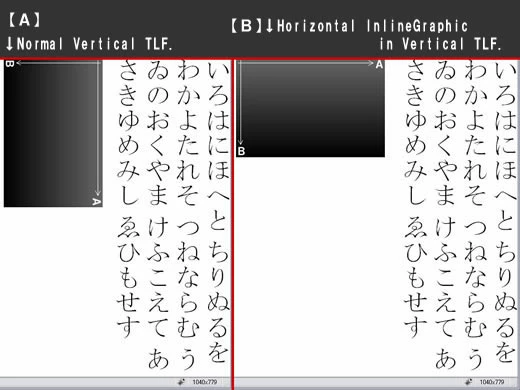
// [ B ] code:
private function init():void { var sampleHTML:String = "<p>いろはにほへと ちりぬるを わかよたれそ つねならむ" +
" うゐのおくやま けふこえて あさきゆめみし ゑひもせす<br/>" + "<img src='test.png'/></p>"; var textFlow:TextFlow = TextConverter.importToFlow(sampleHTML,TextConverter.TEXT_FIELD_HTML_FORMAT); textFlow.addEventListener(StatusChangeEvent.INLINE_GRAPHIC_STATUS_CHANGE,onImgLoad); textFlow.fontSize = 50; textFlow.locale = "ja"; textFlow.blockProgression = "rl"; var container:SpriteVisualElement = new SpriteVisualElement(); addElement(container); var controller:ContainerController = new ContainerController(container,width,height); textFlow.flowComposer.addController(controller); textFlow.flowComposer.updateAllControllers(); } private function onImgLoad(event:StatusChangeEvent):void { if(event.status == "sizePending") { var targetIMG:InlineGraphicElement = event.element as InlineGraphicElement; targetIMG.height = targetIMG.measuredHeight; targetIMG.width = targetIMG.measuredWidth; TextFlow(event.currentTarget).flowComposer.updateAllControllers(); } else if(event.status == "ready" ) { TextFlow(event.currentTarget).removeEventListener(StatusChangeEvent.INLINE_GRAPHIC_STATUS_CHANGE,onImgLoad); //InlineGraphic rotate InlineGraphicElement(event.element).graphic.rotation = 270; InlineGraphicElement(event.element).graphic.y = InlineGraphicElement(event.element).graphic.height; InlineGraphicElement(event.element).width = InlineGraphicElement(event.element).graphic.width; InlineGraphicElement(event.element).height = InlineGraphicElement(event.element).graphic.height; TextFlow(event.currentTarget).flowComposer.updateAllControllers();
} }
Is not there the better ideas?
Should I use TCY for inlineGraphic?
In that case, how should I coding?
Thanks,


 AdChoices