
Problem with non-embedded chinese text
I'm in the process of making a multi-language site and I've been looking into using the new text layout engine.
One of the requirements is that when the site displays chinese characters it uses the users system fonts and not embedded fonts. I've been unable to get this to work. Here is my test code. It creates a textfield using the textlayout and one using just textfield. The textfield one is showing correctly but the textlayout one does not.
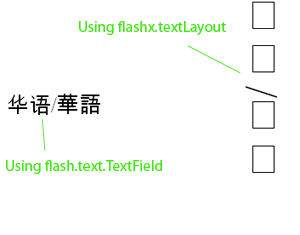
I'm just modifying one of the adobe examples - my code:
package
{
import flash.display.Sprite;
import flash.text.TextField;
import flash.text.engine.FontLookup;
import flash.text.engine.TabAlignment;
import flashx.textLayout.container.ContainerController;
import flashx.textLayout.elements.ParagraphElement;
import flashx.textLayout.elements.SpanElement;
import flashx.textLayout.elements.TextFlow;
import flashx.textLayout.formats.BlockProgression;
import flashx.textLayout.formats.TabStopFormat;
import flashx.textLayout.formats.TextLayoutFormat;
public class TextLayoutFormatExample extends Sprite
{
public function TextLayoutFormatExample()
{
var textFlow:TextFlow = new TextFlow();
var format:TextLayoutFormat = new TextLayoutFormat();
format.fontSize = 24;
format.blockProgression = BlockProgression.RL;
format.fontLookup = FontLookup.DEVICE;
textFlow.hostFormat = format;
var p:ParagraphElement = new ParagraphElement();
var span:SpanElement = new SpanElement();
span.text = "华语/華語";
p.addChildAt(0, span);
textFlow.addChildAt(0, p);
var sp:Sprite = new Sprite();
addChild(sp);
textFlow.flowComposer.addController(new ContainerController(sp,150,200));
textFlow.flowComposer.updateAllControllers();
var tf:TextField = new TextField();
tf.text = "华语/華語";
tf.y = 50;
addChild(tf);
}
}
}
I've tested both compiling the swf and simply viewing it on multiple machines and I get the same result. I have also tried arabic text, which shows up correctly.
I'm using Flex_4.0_b1_061009 sdk
Is there something obvious that I'm doing wrong? I tried using a more recent nightly build but it created compile errors all over my code so I switched back.


 AdChoices