May 25, 2011
Question

Send complex data via web service : discards parts of complex object sent

  • May 25, 2011
  • 1 reply
  • 759 views

Hi,

   I have to send an object to the server via a web service. The object A (say) that is being sent has a lot of properties. Now A has an array collection of objects of type B which in turn has an array collection of type C and so on..

The problem is some of the data is not a part of the xml data sent out.

I have included the snapshots of the data given to the web service and data sent out as seen in the network monitor below.

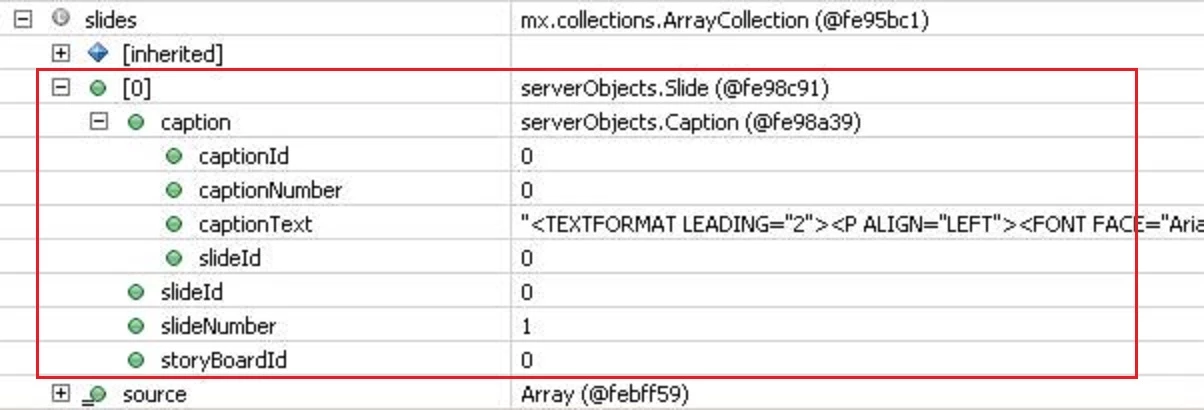
Object sent to the web service

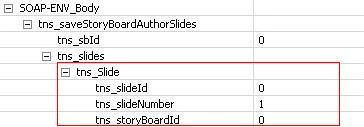
xml data sent out as seen

in the request body in the Network monitor

The object in red rectangle above is of type "Slide" which has an object "caption" of type Caption and other simple properties like slideId (int), slideNumber(int) and storyBoardId(int).

The object in the red rectangle is the xml data of "Slide" corresponding to the object in the red rectangle in the image to the left.

Notice that the entire object "caption" has been dropped while the simple properties have been represented.

I am stuck and cant find a solution to this issue or a work around

any pointers would be really helpful.

thanks in advance

This topic has been closed for replies.

1 reply

May 26, 2011

Posting more images .. have simplified the object a lot but still have the same issue.

1. The request object description as given in the asmx [seen in the browser]

2. The request object's description as given in the wsdl [seen in browser]

3. The object that is being sent to the web service -- as seen in the debugger of Flash builder

4. The object data in xml being sent out of Flex client -- as seen in network monitor of Flash Builder

NOTE : The object data as seen in the network monitor doesnt have the caption" part at all! whereas the debugger shows the caption.

5. The object recieved at the web method  of the web service -- as seen in the debugger of visual studio running the service

If anyone has any work around for this pl let me know.

May 27, 2011

To resolve this issue,

use the data/service import wizard and import the web service by giving its wsdl string.

There would be a class for the service which has all the web methods as functions and also a package of value objects.

Make the call to the service using the class the wizard created and give the input as value objects.

The difference is that the function call of the service class which maps to the web method you intend to call does a bit more. The "loadWsdlIfNecessary" bit in the function call of the service makes sure that the out going xml data of the value object matches the wsdl.