
Participating Frequently
June 2, 2010
Question

Set firstBaselineOffset on multiple containers

  • June 2, 2010
  • 1 reply
  • 1169 views

Hi,

I have a textflow that maps to multiple controllers (that contains a UIComponent each) to get a flow between them.
When I set the firstBaselineOffset to BaselineOffset.LINE_HEIGHT on all controllers it only works on the first container and the others get BaselineOffset.ASCENT.

What is the correct way to set firstBaselineOffset on all controllers in the textflow?

This is the result I get (only the first container gets the text "pushed" down):
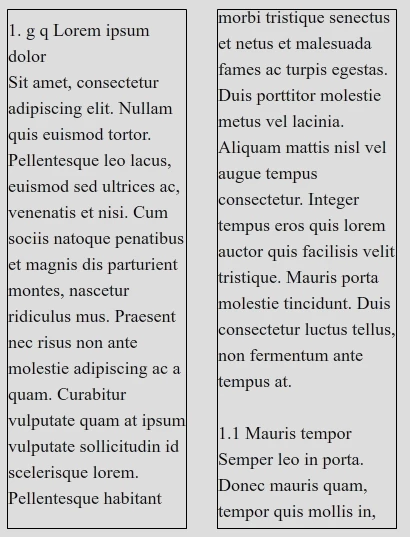
This topic has been closed for replies.

1 reply

Adobe Employee
June 2, 2010

The easiest way, if you want the same value applied for each controller, is to apply it to the TextFlow.

You can do this using IEditManager:

    var format:TextLayoutFormat = new TextLayoutFormat();

    format.firstBaselineOffset = BaselineOffset.LINE_HEIGHT;

    (textFlow.interactionManager as IEditManager).applyFormatToElement(textFlow, foirmat);

- robin

psan83Author
Participating Frequently
June 2, 2010

Hi, and thanks for your answer! Unfortunately that does not work with the property firstBaselineOffset, it works however with other properties (like renderingMode and fontLookup). Maybe there's a special case with firstBaselineOffset?


It does not mather if I add the property value to either the textFlow or the controllers directly, I get the same result (like in the above image).Just for clarification (if somebody else reads this and don't understand what effect I'm after), the text got a text height there that's larger than the font. That's why it's pushed down and that's the effect that I want. (BaselineOffset.LINE_HEIGHT)

If you got an example of it working, that would be great

Thanks again!

Adobe Employee
June 4, 2010

I can't reproduce the problem here.  Might want to dump out the TextLayoutFormat on each ContainerController and look for differences.

Failing that a small smaple would be useful.

Thanks,

Richard