
Known Participant
September 27, 2010
Question

Textlinemetrics?

  • September 27, 2010
  • 1 reply
  • 1718 views

Hi TLF pros,

I try to get the right height of a textflow - unfortuntaley the returned value of the container (Sprite) height is too large:

I extended a simple "Hello World" example and tried to visualise the problem:

private function init():void
        {       
            var format:TextLayoutFormat = new TextLayoutFormat();
            format.fontSize = "120";
            format.fontFamily = "Times";
           
            var textFlow:TextFlow = new TextFlow();
            textFlow.format = format;
           
            var p:ParagraphElement = new ParagraphElement();
            textFlow.addChild(p);
           
            var span:SpanElement = new SpanElement();
            span.text = "Hello, World";
            p.addChild(span);
                       
            textFlow.flowComposer.addController(new ContainerController(this, 400, 300));
            textFlow.flowComposer.updateAllControllers();    

            // "LETS draw the height"

            graphics.beginFill(0xff0000);
            graphics.drawRect(0, 0, 10, height);
            graphics.endFill();
        }

   The final output looks like:
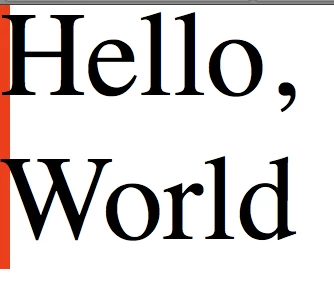
You can see that the red rectangle's height (= containerController.height) is bigger than the "textfield".

- > That makes no scense for me - I want to get the exact height of the textflow.

Further, the first line has a small "padding-top" of 5-7 pixels. -> A: How do I get rid of that?

B: How do I get the "real" height of this text? I cant find something like a "getTextLineMetrics property.

THANKS!

// - - - - - - - - - - - - - -

I tried to add optimize some Textlayoutformat properties, but without success:

format.paragraphSpaceBefore = 0;
format.paddingTop = 0;

format.paragraphSpaceAfter =0;

format.paddingBottom = 0;

This topic has been closed for replies.

1 reply

Adobe Employee
September 27, 2010

The reason why the height is not as you expect is because it is leaving room for a descender. Here's what it looks like with the descender, and the ContainerController's contentBounds outlined in green:

So the extra space at the bottom is space left for the descender.

The extra space at the top in your example isn't duplicated here, probably because you are using Times, and my example is Arial. The first line is placed relative to the top of the container (assuming no paddingTop), such that its baseline will be equal to the font's ascent value. It may be that the Times font has a larger ascent in order to accomodate captial letters with accents; for whatever reason, the ascent of Times is larger than strictly required for the letters you use in your example.

Here's the application I used to generate the image:

package {
   
    import flash.display.Sprite;
    import flash.geom.Rectangle;
   
    import flashx.textLayout.container.ContainerController;
    import flashx.textLayout.elements.*;
    import flashx.textLayout.formats.TextLayoutFormat;
   
    [SWF(width="450", height="300")]
    public class Bug extends Sprite
    {
       
        public function Bug()
        {
            super();
            init();
        }

        private function init():void
        {      
            var format:TextLayoutFormat = new TextLayoutFormat();
            format.fontSize = "120";
            format.fontFamily = "Times";
           
            var textFlow:TextFlow = new TextFlow();
            textFlow.format = format;
           
            var p:ParagraphElement = new ParagraphElement();
            textFlow.addChild(p);
           
            var span:SpanElement = new SpanElement();
            span.text = "Hello, Worldy";
            p.addChild(span);
           
            textFlow.flowComposer.addController(new ContainerController(this, 400, 300));
            textFlow.flowComposer.updateAllControllers();   


            // "LETS draw the height"
           
            graphics.beginFill(0xff0000);
            graphics.drawRect(0, 0, 10, height);
            graphics.endFill();
           
            graphics.lineStyle(1, 0x00FF00);
            var r:Rectangle = textFlow.flowComposer.getControllerAt(0).getContentBounds();
            graphics.moveTo(r.left, r.top);
            graphics.lineTo(r.right, r.top);
            graphics.lineTo(r.right, r.bottom);
            graphics.lineTo(r.left, r.bottom);
            graphics.lineTo(r.left, r.top);
        }
    }
   
}

- robin

Known Participant
September 27, 2010

Thanks a lot for you answer robin!

It makes abolutely sense, but there has to be a way to get the textfields height without the descender's height.

Does the TLF not support a metrics property? I cant find one.

If not and you want to align another Sprite directly 12 pixels under a "container" it is impossible to implement design properly. Same with aligning textfields to the middle of a button.

Example: textfield.y = button.height/2 - textfield.height/2; // the textfield (container) gets wrong aligned because of the descenders height.

THANKS!

Adobe Employee
September 27, 2010

To align with the baseline of the last line (not including descenders) just get the y position of the last TextLine in the

container Sprite. Unlike other flash DisplayObjects, a TextLine's origin is on its baseline.

- robin