
Inspiring
October 6, 2010
Question

TLF 2.0, wrap text, image float

  • October 6, 2010
  • 1 reply
  • 3435 views

Hi,

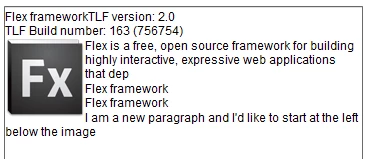
I'm trying to wrap text around an image  with TLF version: 2.0, Build number: 163

and Flex Hero SDK 4.5 (Build 4.5.0.17855).

All is ok but paddingRight and paddingLeft has no effect

Any idea ?

Code :

var version:String = "";

version += "TLF version: " + BuildInfo.VERSION + "<br/>"+"TLF Build number: " + BuildInfo.kBuildNumber;

var s:String = "";

s += "<TextFlow  xmlns='http://ns.adobe.com/textLayout/2008'>";

s += "<p>Flex framework"+version+"</p>";

s += "<p><img source='http://www.adobe.com/products/flex/images/flex_80x79.png' width='80' height='79' float='left' paddingRight='20' paddingLeft='20'/>Flex is a free, open source framework for building highly interactive, expressive web applications that dep</p>";

s += "<p>Flex framework</p>";

s += "<p>Flex framework</p>";

s += "<p>I am a new paragraph and I'd like to start at the left below the image</p>";               

s += "</TextFlow>";

messageTA.textFlow = TextConverter.importToFlow(s, TextConverter.TEXT_LAYOUT_FORMAT);

Other question:

I would like a new paragraph but with no wrap.

The text must begin at the left below the image.

Any help will be appreciated.

Philippe
This topic has been closed for replies.

1 reply

Inspiring
October 7, 2010

OK, I have found the solution (after reading ReleaseNotes.txt)

of the latest build found here (build 168):

https://sourceforge.net/downloads/tlf.adobe/latest/

- add to TextFlow :  version='2.0.0'

- for the paragraph to begin at the left, add : <p clearFloats='start'>

The modified code:

var s:String = "";
s += "<TextFlow version='2.0.0' xmlns='http://ns.adobe.com/textLayout/2008'>";
s += "<p>Flex framework"+version+"</p>";
s += "<p><img  paddingTop='10' paddingRight='20' paddingLeft='20' source='http://www.adobe.com/products/flex/images/flex_80x79.png' width='80' height='79' float='left'/>Flex is a free, open source framework for building highly interactive, expressive web applications that dep</p>";
s += "<p>Flex framework</p>";
s += "<p clearFloats='start'>I am a new paragraph and I'd like to start at the left below the image</p>";               
s += "</TextFlow>";

TLF 2.0 is a "super" version...

Philippe

Known Participant
October 22, 2010

Hey Philippe,

I have hero sdk 4.5.0.17855 and just dropped textLayout.swc build 183 in the libraries (i removed the one hero uses by default)

It doesn't want to dynamically load images. It works only with static and Embed tag.

Was there something that I missed?

Inspiring
October 22, 2010

Hi Tork,

Try this:

This code insert an image at cursor position (with split of paragraph). The image is based on an URL.

        protected function initApp():void {

            var version:String = "";
            version += "TLF version: " + BuildInfo.VERSION + "<br/>"+"TLF Build number: " + BuildInfo.kBuildNumber;

            var s:String = "";
            s += "<TextFlow version='2.0.0' xmlns='http://ns.adobe.com/textLayout/2008'>";
            s += "<p>Flex framework"+version+"</p>";
            s += "<p>Flex is a free, open source framework for building highly interactive, expressive web applications that dep</p>";
            s += "<p>Flex framework</p>";
            s += "<p>Flex framework</p>";
            s += "<p>I am a new paragraph and I'd like to start at the left below the image</p>";               
            s += "</TextFlow>";

            messageTA.textFlow = TextConverter.importToFlow(s, TextConverter.TEXT_LAYOUT_FORMAT);
        }

        protected function doInsertImage():void
        {           
            var interactionManager:IEditManager = messageTA.textFlow.interactionManager as IEditManager;
            var pos:int = interactionManager.anchorPosition;
            if (pos < 0)
            {
                interactionManager.selectRange(0,0);
                pos = interactionManager.anchorPosition;
            }
            var selectionState:SelectionState = new SelectionState(messageTA.textFlow, pos, pos);
            var operation:SplitParagraphOperation = new SplitParagraphOperation(selectionState);
            interactionManager.doOperation(operation);
            interactionManager.insertInlineGraphic(new URLRequest("http://www.adobe.com/products/flex/images/flex_80x79.png"), 'auto', 'auto', "left");
        }
    ]]>
</fx:Script>
<s:VGroup left="5" right="5" top="10" bottom="82">
    <s:Button label="Insert Image at cursor position" click="doInsertImage()"/>
    <s:TextArea id="messageTA"  width="100%" height="100%" editable="true" />
</s:VGroup>

Philippe