
TLF 2/2.1/3 Weird behavior with floating graphics?
Hi guys,
I'm working on a chat application running on RED5 / AS3 and I'm struggling to get my client "UI" working perfectly.
My problem is related to the TL Framework, on every version available.
Basicly, I want to display a picture ( for user messages ) and icons ( for notifications ) on the left side of my lines, like this :
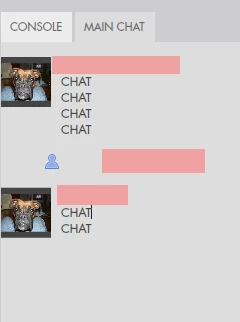
So, I'v been messing around with "float=start", "float=left" and such, but i'm always encountering weird behaviors whenever I scroll or resize my containerController. It's quite easy to reproduce with the following code :
public class Main extends Sprite
{
private var controller:ContainerController;
public function Main():void
{
if (stage) init();
else addEventListener(Event.ADDED_TO_STAGE, init);
}
private function init(e:Event = null):void
{
stage.scaleMode = StageScaleMode.NO_SCALE;
stage.align = StageAlign.TOP_LEFT;
removeEventListener(Event.ADDED_TO_STAGE, init);
var holder:Sprite = new Sprite();
addChild( holder );
var tFlow:TextFlow = new TextFlow();
for ( var i:int = 0; i < 50; i++ )
{
tFlow.addChild( createLine() );
}
controller = new ContainerController( holder, 400, stage.stageHeight );
tFlow.flowComposer.addController( controller );
tFlow.flowComposer.updateAllControllers();
stage.addEventListener( Event.RESIZE, resizeController );
}
private function resizeController( e:Event ):void
{
controller.setCompositionSize( 400, stage.stageHeight );
controller.textFlow.flowComposer.updateAllControllers();
}
public function createLine( ):DivElement
{
var d:DivElement;
var p:ParagraphElement;
var im:InlineGraphicElement = new InlineGraphicElement();
im.source = new Bitmap( new BitmapData( 16, 16, true, 0x30FF0000 ) ); // 0x30 Alpha
im.float = "left";
d = new DivElement();
d.clearFloats = "both";
p = new ParagraphElement();
d.addChild( p );
p.addChild( im );
return d;
}
}
Basicly, I'm stacking 50 transparent "floating" elements. It works fine most of time, but if I randomly resize my Flash Player Window, I can get the first "invisible" element to overlap the last "visible" :
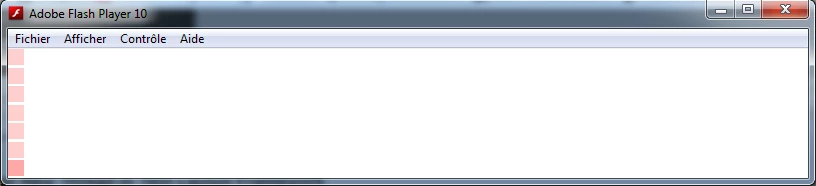
It seems to be happening right when the last "floating" element should disappear. Instead, it gets "over" the previous one. It happens upon container resize and scrolls. I'v encountered this issue on lastest 2, 2.1 and 3 TLF builds.
Beside the visual "bug", it also screws up my container.getContentBounds().height calls - which can make scrolling "trembling", as the height gets reajusted.
I'm running out of ideas about how to handle this. This bug appears whenever I use "floating" graphics and I can't think of any other way to display graphics on the left side of my chat-lines.
Maybe someone ran into this very problem and figured out a way to make it work?
Excuse my english, thanks in advance,
Lionel.
 AdChoices