


Known Participant
June 22, 2011
Question

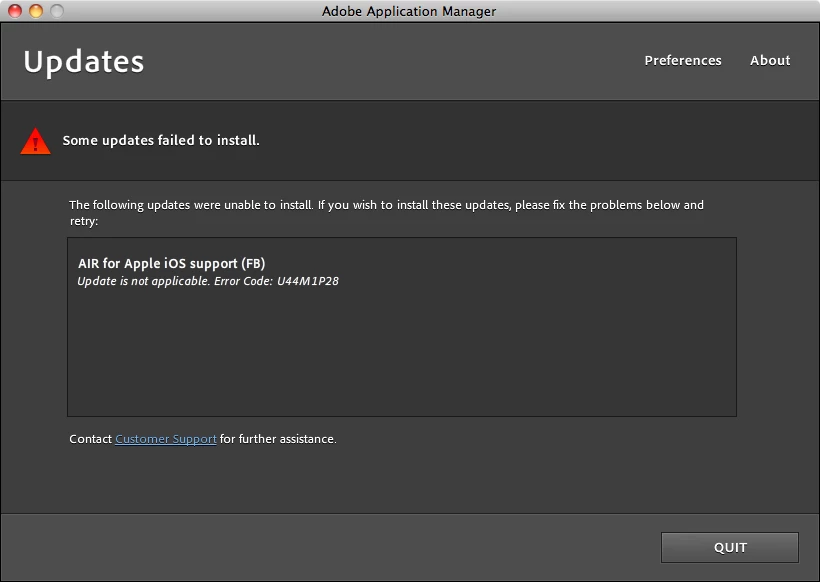
Update Failed: AIR for Apple iOS support

  • June 22, 2011
  • 1 reply
  • 11384 views

While Updating my Flash Builder 4.5 to 4.5.1, and 2 other updates, one being the AIR for Apple iOS support.

When I try installing the update for the iOS support, I get the message: Update is not applicable. Error Code: U44M1P28
    This topic has been closed for replies.

    1 reply

    Participating Frequently
    June 22, 2011

    Hi,

    try that thread:

    http://forums.adobe.com/thread/867868?tstart=0

    and other on dedicated section,

    hth,

    regards,

    Peter

    Yozef0Author
    Known Participant
    June 23, 2011

    I've read the problems mentioned in that post, but I don't think we have the same problem.

    I have done the suggestion by this post, but did not work for me, as I got the same error, Error Code: U44M1P28

    My problem is I have not reached a point to export my AIR for iOS.

    The error that reoccurs is while installing, it fails to install.

    Yozef0Author
    Known Participant
    June 24, 2011

    Trying to figure out another solution, I uninstalled Flash Builder 4.5 Premium, to install a new full version of 4.5.1 from Adobe's website.

    While Installing, I get the following message which showed me exactly where my problem is... I have a prereleased version of AIR for Apple iOS Support.

    The Question is... How do I uninstall the prerelease version of AIR for Apple iOS Support? I uninstalled FB4.5, and I removed the remaining folder after installation that was in Flash Builder 4.5 that was in Utilities. though, I still get the message above...

    Any idea on how to Uninstall a Prerelease version of AIR for Apple iOS Support?! No where to be found online.