
Change Units in Edit Stroke Style Panel
Let's start this post off with an image:
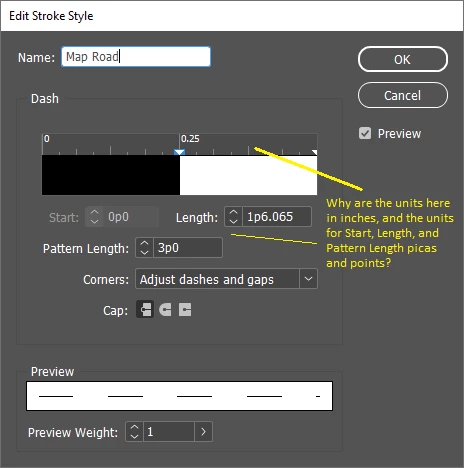
My primary query: How do I change the measurement units for the Edit Stroke Style panel to inches?
I have already tried the non-helpful step of Edit > Preferences > Units & Increments. In that panel, the only choice that comes remotely close is "Other Units", from which I can choose either Points or (of all things) Millimeters. Really. In an application which also employs points, picas, and inches in the same document.
I know that changing the units to inches in the Edit Stroke Style panel is possible, because in this video: Create New Stroke Styles in InDesign cc (youtube.com) Amy's panel displays only inches (the panel in question displays beginning at 2:22).
Even if I need a custom plug-in, that will do. If that is a solution, please include a link to the plug-in in your reply. Thank you.
-------------------------------------------------------
An aside: I have spent nearly my entire desktop publishing career (about three decades) trying to unravel Adobe's pica/point obsession. For all the complexity of their wonderful applications, the fact that there is no single method for changing the entirety of measurement units in a file - let alone a method for changing the default thereof for any future files - is a wonder. Cheers.


 AdChoices