
Zorrina83
Participant
July 13, 2017
Answered

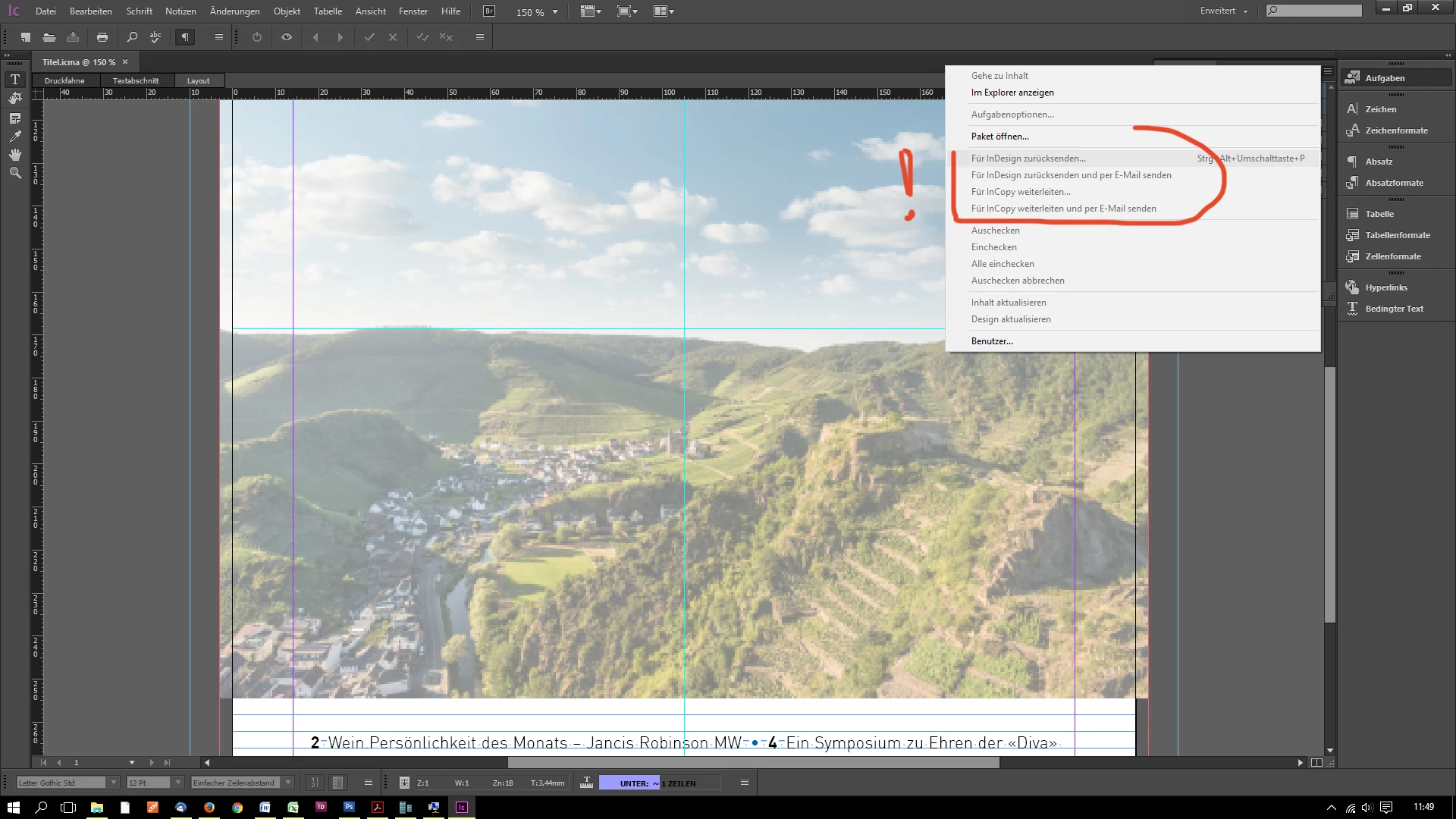
"Für InDesign zurücksenden und per E-Mail senden" in InCopy CC nicht auswählbar

  • July 13, 2017
  • 1 reply
  • 620 views

Liebe Community,
ich hoffe, ihr könnt mir Klarheit verschaffen.


Eine .icma-Datei (extern aus InDesign vom iMac, InDesign-Version unbekannt) konnte ich in meinem InCopy CC (Windows 10, reguläre Kaufversion, gekauft im Juli 2017) problemlos öffnen, bearbeiten und speichern.
Nur danach sind die Punkte zum Weiterleiten und Senden NICHT auswählbar, d.h. ich kann kein Paket packen und zurücksenden.

Alle Punkte der Rubrik, u.a. "Für InDesign zurücksenden und per E-Mail senden" sind NICHT auswählbar und stets grau hinterlegt, egal was ich mache.

Was mache ich falsch? Habe ich etwas übersehen?
Oder liegt hier ein Kompatibilitätsprobem vor?
Der Arbeitsbereich ist auf "Erweitert" und "Vollständige Menüs anzeigen" eingestellt. Meine eigene InDesign Version ist übrigens InDesign CS3, ich denke aber, dass dies nichts damit zu tun hat.
Ein Screenshot ist dabei.

Vielen Dank schon mal im Voraus,
herzliche Grüße,
Jasmin
This topic has been closed for replies.
Correct answer AnneMarie Concepcion

But was it sent to you as a folder with separate files (the .icma file, the content folder, and the icml files), or even as separate files that were in a .zip? Or was it sent to you as a single file with the .icap extension, meaning it was an InCopy package?

As Bob said, the only way to return a package to InDesign is if you received a package (the .icap file) in the first place. Only the InDesign user can create the .icap; in InDesign they select the assignment file and from the Assignment panel menu they choose Package for InCopy. That creates the .icap file, which they send to you.

It's possible, from your message, that the designer went to the project files on their computer or the server and manually grabbed the assignment file, the content folder, etc. and sent that to you. If so, that's why Return for InDesign is inaccessible.

The fix for now -- if you made edits to the stories -- is for you to locate the ICML files in their content folder on your hard drive and send it back to the designer. They will need to manually drag those icml files into the current content folder, saying "Yes" at the "Replace?" prompt.  Then in InDesign they can update the out of date links. This is known as "flying on the trapeze without a net" ;-)

There is no need for you to return the assignment file.

From now on, have the designer send you an .icap file. Then you can return the .idap (Return for InDesign) to them when you're done. Tell your other InCopy-using friend the same thing.

AM

1 reply

BobLevine
Community Expert
Community Expert
July 13, 2017

Did you receive an ICMA file or did you receive and InCopy package. As far as I know, unless you received a package you won’t be able to return it as a package.

Zorrina83
Zorrina83Author
Participant
July 13, 2017

Dear BoBLevine,
I did receive a folder with an .icma-file, together with a content-folder with several separate .icml-files in it. Both, .icma and icml-files, are not possible to pack them again and return them to InDesign.
My colleague "on the other side", with InDesign on iMac, told me today, that she has the same InCopy-problem...

Thanks for your feedback,
Jasmin

AnneMarie Concepcion
Community Expert
AnneMarie ConcepcionCommunity ExpertCorrect answer
Community Expert
July 13, 2017

But was it sent to you as a folder with separate files (the .icma file, the content folder, and the icml files), or even as separate files that were in a .zip? Or was it sent to you as a single file with the .icap extension, meaning it was an InCopy package?

As Bob said, the only way to return a package to InDesign is if you received a package (the .icap file) in the first place. Only the InDesign user can create the .icap; in InDesign they select the assignment file and from the Assignment panel menu they choose Package for InCopy. That creates the .icap file, which they send to you.

It's possible, from your message, that the designer went to the project files on their computer or the server and manually grabbed the assignment file, the content folder, etc. and sent that to you. If so, that's why Return for InDesign is inaccessible.

The fix for now -- if you made edits to the stories -- is for you to locate the ICML files in their content folder on your hard drive and send it back to the designer. They will need to manually drag those icml files into the current content folder, saying "Yes" at the "Replace?" prompt.  Then in InDesign they can update the out of date links. This is known as "flying on the trapeze without a net" ;-)

There is no need for you to return the assignment file.

From now on, have the designer send you an .icap file. Then you can return the .idap (Return for InDesign) to them when you're done. Tell your other InCopy-using friend the same thing.

AM