
Answered
InCopy Cloud Error: Saved with a newer version
Hello good folks!
I'm a new InCopy user and when I try to open an InDesign file saved to a DropBox, I get the following error message:
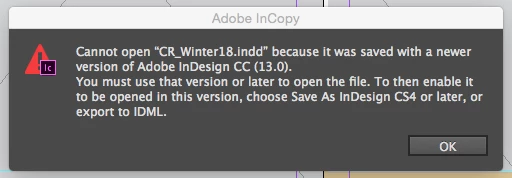
Simple, right? Well I'm using Adobe Creative Cloud and it's all updated. When I click open the "versions" tab of InCopy, only versions 12 and earlier are available.
We opened the same Creative Cloud account on a co-workers machine and did not get the same error message, so it's something to do with my machine. I've got a 2013 MB Air that is all up to date. I am getting a little low on memory, but I'm not getting any error messages related to storage or things being out of date... Any ideas about how to resolve?
Thanks!


 AdChoices