
Participant
January 2, 2020
Question

Incopy Story bar says "In use by (Me) & (Indesign File that doesn't exist)" and unable to check-in

  • January 2, 2020
  • 3 replies
  • 885 views

I've tried to copy the IC text into a new IC document, but, if I name it the same name — the next time i open it the story bar says "in use" by the same indesign document (which does not exist) 


Tried to "Check In" but it is unavailable.
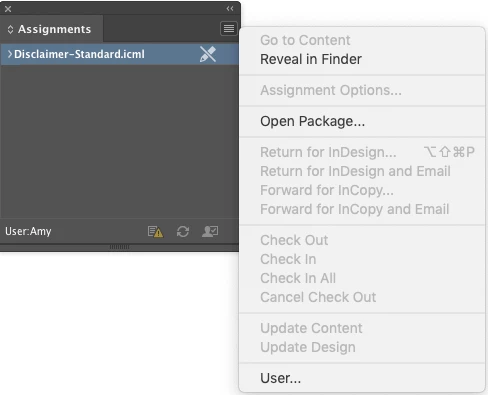


Any suggestions besides just renaming the file?


This topic has been closed for replies.

3 replies

Kraeg
Known Participant
November 17, 2020

Not certain if you've ever found a fix for this, but I wanted you to know you aren't alone. I've had the same thing happen where I use an Incopy file containing our copyright info, placed in a very large number of InDesign files. I have separate Incopy files for each language that we translate it to. However it is our Japanese file that is the one listed as the file that is using our English copyright Incopy file. This is not true, nor does it exist within that file anywhere.
Here is where things get weird... I actually created a brand new InCopy file and retyped the entire Copyright info from scratch. Then I saved two versions of that file, one with the suffix '-new' attached and one with the original file name. Now this file is brand new and not connected whatsoever to the Japanese file that seems to be causing the grief. However, now when I open the brand new English Support file in InCopy it still maintains it's in use by the Japanese version even though I haven't opened the Japanese version, or the Japanese copyright file at all during this resaving process. By comparison, the one i saved with the '-new' suffix works just fine, no odd links to alternate files or universes whatsoever. 
If i've explained this clearly enough, the strangeness of this should be clear.

Participant
January 16, 2020

story 

BobLevine
Community Expert
Community Expert
January 2, 2020

There's no where near enough info here. Has that file been placed into an INDD file? Did you close it without checking it back in? What version of InCopy? Are you working alone or with someone.


Please provide full details on this.

Participant
January 2, 2020
Sorry i guess some of my info was in the subject line and not in body copy.
 
Has that file been placed into an INDD file? - Yes - many. The one listed in the story bar is in use by me and the indesign doesn't exist (has been deleted)
 
Did you close it without checking it back in? Are you working alone or with someone. I believe someone esle checked it out at some point and didn't check it in however since i was the last to use/open that indesign document it is now attached to me.  
 
What version of InCopy? 13.0
 

I really just want to unlink it from that indesign document... that doesn't exist.