
Participant
May 18, 2022
Question

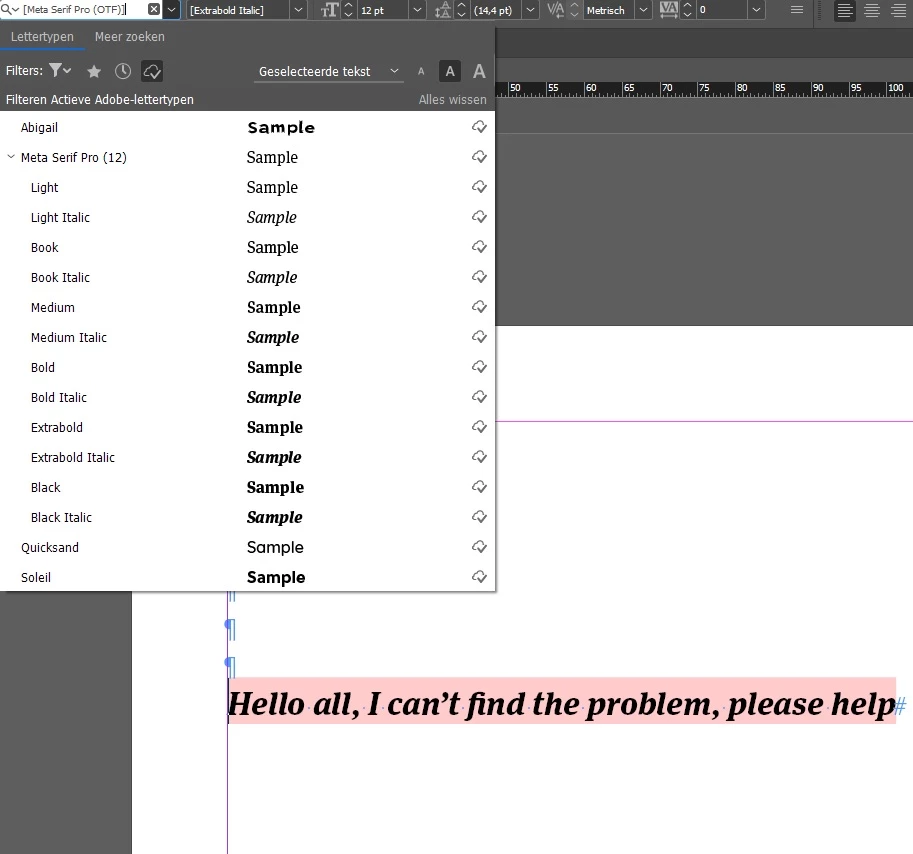
Installed and activated font can't be found in InCopy

  • May 18, 2022
  • 1 reply
  • 458 views

Hi all,


I have a strange problem: I've installed and activated a certain font, Meta Serif Pro, using Adobe Creative Cloud Fonts and I want to use it. I see the font, I can use it in InDesign, but when I want to use it with InCopy, the font is in brackets eand the text is pink, meaning the font can't be found. This is extra weird because I can litterally see the font in the drop-down menu in InCopy, as well as all the font-types (Itallic, Bold, etc.)


Could anyone please help? Thanks a bunch!

Cheers,

Arthur
 

This topic has been closed for replies.

1 reply

BobLevine
Community Expert
Community Expert
May 18, 2022

Are you fully updated to 17.2.1?

IEX MediaAuthor
Participant
May 18, 2022

Hi Bob,


All my apps are up to date. InCopy is Version 17.2, it says this is the newest version.

BobLevine
Community Expert
Community Expert
May 18, 2022

Yeah, sorry...ID was updated to 17.2.1.

I just activated that family and I'm not seeing a problem. Are you trying to open a file that uses that font or create a new InCopy file? Did you install it from InDesign or did you visit the Adobe fonts website to activate it?