

Fourteen
Inspiring
February 9, 2017
Answered

Is there a "Reveal in Explorer" option (or similar) in InCopy?

  • February 9, 2017
  • 2 replies
  • 1030 views

I think I've exhausted every place I can look for this on a PC with no luck. On a Mac you can simply right-click on the document's title in the tab, however on a PC I can find nothing similar. If anybody knows a way to do this I would be very happy to be enlightened - and if there is no way I'll be glad to add it as a feature request.

Thanks in advance!
    This topic has been closed for replies.
    Correct answer Fourteen

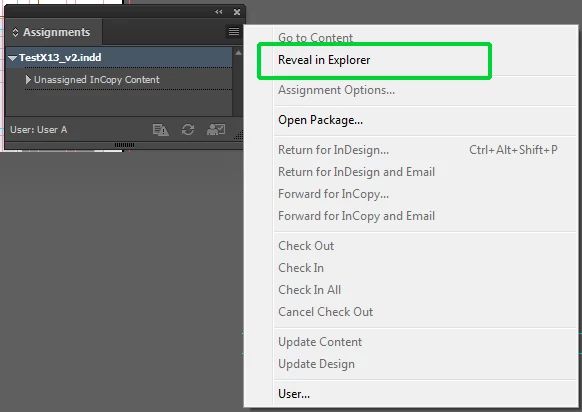
    Ahh, I found it after a bit more looking. If you open the "Assignments" palette, select the file name and then use the menu you can choose it. I'd delete this, but it may actually be of use to someone who had the same problem finding it.

    2 replies

    BobLevine
    Community Expert
    Community Expert
    February 9, 2017

    If you’re referring to the links then it works exactly the same on Mac and Windows.

    Open the links panel, right click on any link and choose reveal in Explorer.

    If that’s not what you’re referring to you’ll need to provide much more detail. If it is and that is not what you’re seeing then try trashing your preferences.

    Fourteen
    FourteenAuthorCorrect answer
    Inspiring
    February 9, 2017

    Ahh, I found it after a bit more looking. If you open the "Assignments" palette, select the file name and then use the menu you can choose it. I'd delete this, but it may actually be of use to someone who had the same problem finding it.