

Fourteen
Inspiring
April 16, 2019
Answered

No horizontal scrollbar
  • April 16, 2019
  • 2 replies
  • 1832 views

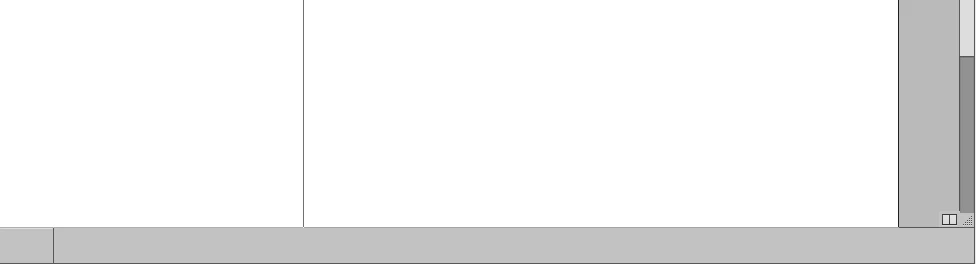
Does anybody have any guesses for what would cause this? It appears that InCopy doesn't create a horizontal scroll bar at all (even if it wasn't needed there would still be the graphic element for it) or it is placed incorrectly somewhere behind the bottom panel. Reinstalling InCopy solved the issue temporarily but it returned shortly thereafter. (I'm not having the issue myself - trying to help a user who is.) If you look at a close up things appear not to be aligned correctly:
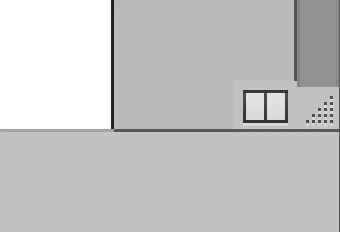
My only guess would be that it has to do with the screen resolution but I've not seen this before. Thanks for any help.

    This topic has been closed for replies.
    Correct answer Srishti Bali

    This is CC2018 and - although I am not 100% positive - I am pretty sure that it is Windows 10. Although I'd need to check with the user to be sure.


    Hi there,

    Sorry to hear about this. As you have already tried resetting preferences and reinstalling InCopy, please check how InCopy works in Hidden admin account (How to enable the hidden Windows 10 administrator account - gHacks Tech News ). If it does not work as expected, please try reaching us for a live troubleshooting session at Contact Customer Care.

    Regards,

    Srishti

    2 replies

    bartb78
    Participant
    July 15, 2021

    I have InCopy on a Windows PC and I got the same problem: no horizontal scrollbar. Fixed it by opening InCopy 'As administrator'. Scrollbar showed up, and the next time I opened InCopy the regular way, it was still there. So right-click on the icon and choose 'Run as administrator'. In your Start menu: right-click on the icon, choose 'More >', and then select 'Run as administrator'.

    BobLevine
    Community Expert
    Community Expert
    April 16, 2019

    Could be corrupt preferences. Try trashing them.

    Fourteen
    FourteenAuthor
    Inspiring
    April 16, 2019

    Thanks Bob, they've tried that and have also reinstalled the application but end up with the same results. Apparently things worked briefly after the new install but after a restart the scrollbar was gone again. I unfortunately can't do much hands on troubleshooting or check different preferences so was just hoping somebody may have seen the issue previously.

    BobLevine
    Community Expert
    Community Expert
    April 16, 2019

    Is it a supported configuration? What version of IC and what operating system?