
Participating Frequently
September 19, 2025
Pregunta

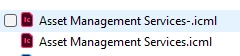
Saving InCopy files, it is automatically adding a dash to the name when saving as and replacing

  • September 19, 2025
  • 1 respuesta
  • 175 visualizaciones

Hello! 

I am running into an issue where I am trying to save over and replace an InCopy file with the same name, but every time I do it adds a dash at the end of the name and thus changes the link. I for sure am hitting yes when it asks if i want to replace when I am trying to save over, so I am not sure why it is changing the name and keeping both files.
 

    1 respuesta

    BobLevine
    Community Expert
    Community Expert
    September 19, 2025

    Why are you working like this? You should just open the InDesign file it's saved in, check it out, make the edits and check it back in.

    Participating Frequently
    September 19, 2025

    Hi thanks! That didnt answer my question 🙂 We had to change the whole design of the page not just the content.

    BobLevine
    Community Expert
    Community Expert
    September 19, 2025

    The layout is irrelevant. Once the content is placed in the InDesign file, you cannot just open the ICML file and resave it. That's not how this workflow functions.


    Using InCopy, open the INDD file and do the edits as I described above.