
Participating Frequently
September 11, 2017
Answered

Text wrapping does not work in Notes

  • September 11, 2017
  • 2 replies
  • 1378 views

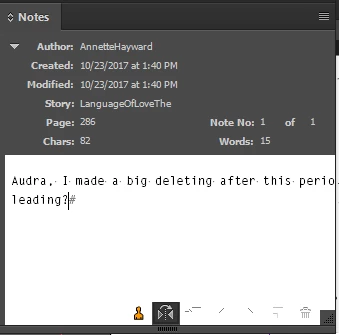
Text wrapping is not working properly when creating a new note in InCopy, nor does it work on an existing note. The text will jump to the next line after 61 characters, unless the window is configured for a larger number of characters. This occurs both with and without spaces.

Please advise.
    This topic has been closed for replies.
    Correct answer BobLevine

    Here is a screenshot of the issue. As you can see, there are supposed to be 82 characters in the note, and only a few dozen appear on the note without text wrapping.


    Looks like an issue with corrupt preferences. I notice there's no scroll bar in that panel.

    Have the user trash their preferences and it should be fine.

    this thread explains it for InDesign but the steps for InCopy are the same.

    Troubleshooting 101: Replace, or "trash" your InDesign preferences

    2 replies

    BobLevine
    Community Expert
    Community Expert
    September 19, 2017

    Notes are not part of the text flow so I'm not sure what you're referring to. Perhaps you're referring to image captions? Can you post some screenshots?

    Fourteen
    Inspiring
    September 19, 2017

    I think it's in reference to the way the text is displayed on the palette when using "Notes mode". I'm not able to replicate the issue with CC2017 running Windows 10. Might be one of those things that could be resolved by trashing the preferences if it hasn't already been done.

    BobLevine
    Community Expert
    Community Expert
    September 19, 2017

    Ah. Yes, that could be it. I wonder if it's a UI or O/S scaling issue.

    Fourteen
    Inspiring
    September 19, 2017

    Which version of InCopy are you using, and is this on a Mac or PC?

    Participating Frequently
    September 19, 2017

    Thank you for your response, Fourteen.

    This is on an i5 Microsoft Surface running Win10 Enterprise 1607, using the most recent version of InCopy 2017.

    BobLevine
    Community Expert
    Community Expert
    September 19, 2017

    Are you using the touch workspace? Hmmm, now that I ask, I'm not even sure there is one.