
Participating Frequently
May 7, 2020
Question

Toolbars are all misaligned

  • May 7, 2020
  • 4 replies
  • 1271 views

When I open InCopy, my toolbars look like this:
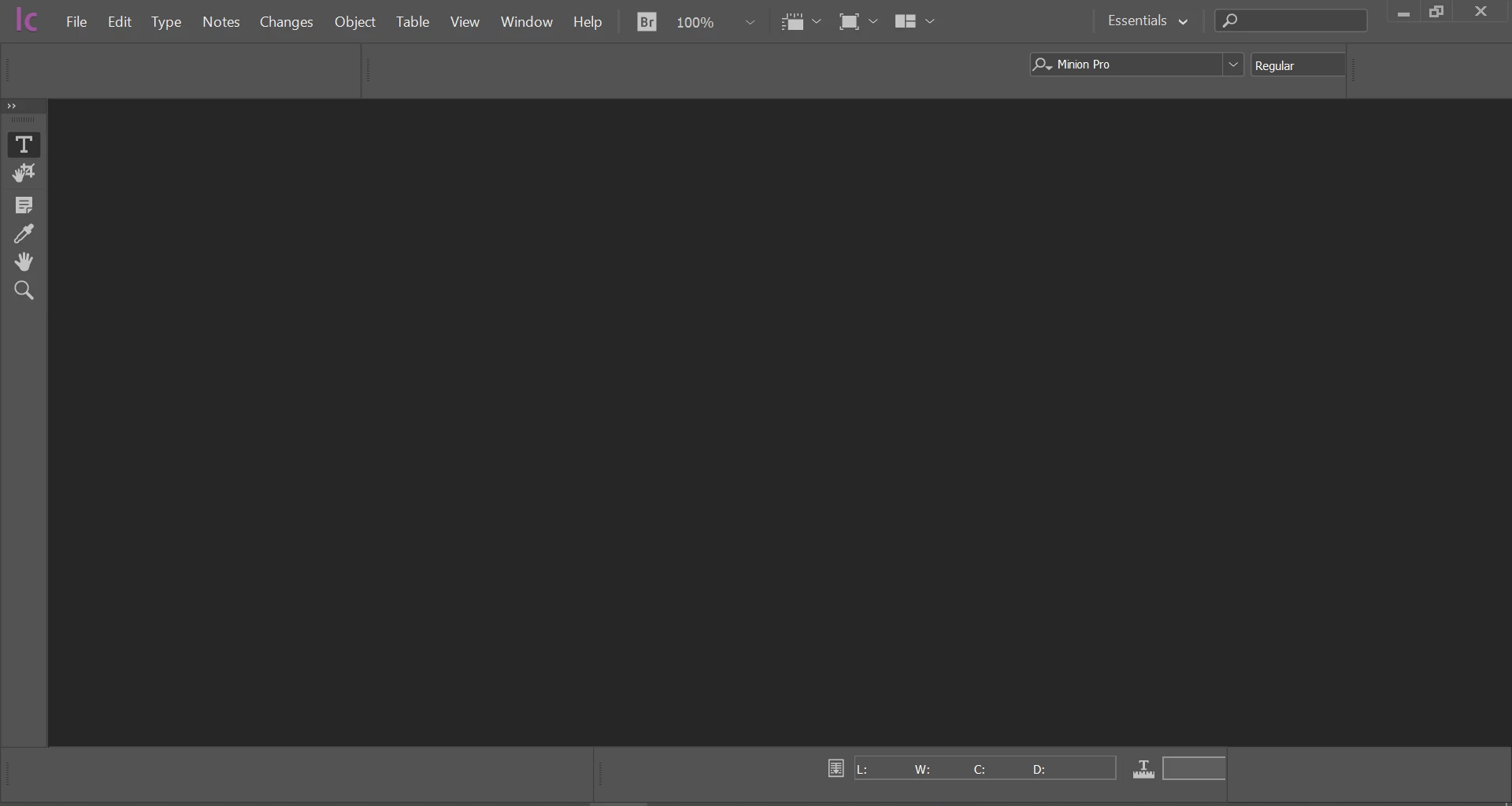


No matter what I do, I cannot fix this:

  1. Issue presents in 2018, 19 and 20 on Windows 10;
  2. Resetting the workspace has no effect;
  3. Toggling different workspaces has no effect;
  4. Dragging toolbars works for some toolbars in single session but when I reopen InCopy, it's back to this;
  5. Trashing prefs works for the first open, but subsequent opens return to this;
  6. Uninstalling has no effect, it opens like this;
  7. Creating a new workspace and checking panel locations has no effect on restart;
  8. Snapping the window to top or side in Windows 10 has no effect;
  9. Adding and removing different size and resolution monitors has no impact;


It really looks like the padding in each bar is set to something ridiculous. Does anyone have any ideas about this? Gratefully received!


    4 replies

    Participant
    July 8, 2020

    Hi there,

    We are beginning to roll out an InCopy workflow at our company and the first two users have also experienced the issue of panels disappearing. Trashing preferences is a temporary solution, but eventually the panel content disappears. We can't move forward until this is resolved. The only difference is I have InCopy installed on my personal mac running an older version of OS (High Sierra) and haven't experienced any issues, my colleagues are on work-issued PCs running Windows 10.

    Participant
    July 16, 2020

    I'm also having issues with panels. I have mine on the side and they get larger and larger every time I open the program and there's no grab bar showing up to pull them back. Brand new machine, brand new installation.

    Participant
    May 13, 2020

    I had a very similar issue on two Windows-machines yesterday. It's at a corporate system, so all users have managed computers and should have the same configuration. Oddly, 8 of the ten were working fine, but two had misalignment in two of the panels. Followed the same troubleshooting. On resetting preferences everything was fine on first launch, on the second it was back to this issue where these two toolbars were wrongly left padded. This is Windows 10 as well, with InCopy 14.02

    Participating Frequently
    May 13, 2020

    Hi Paffen,


    Sorry you are having the same issue but glad to hear it's not just me and my users! I have a similar issue in terms of it not being spread evenly between users as well.


    Can I ask if you're using any plugins? Maybe we have a shared setting or something that we can work out together?

    Participant
    May 13, 2020

    No plugins used. Just a straight installation and it shows up like that from second run.

    Participating Frequently
    May 7, 2020

    Hi Bob,


    Thanks for coming back so quickly!


    Well I actually have this on a few machines. A T480 ThinkPad, a 2018 Macbook Pro, and a Dell Inspion 7000.

    BobLevine
    Community Expert
    Community Expert
    May 7, 2020
    Have you tried opening a file?
    Participating Frequently
    May 7, 2020

    I have and it's all the same. Sorry I should have taken a screenshot with the file open!

    BobLevine
    Community Expert
    Community Expert
    May 7, 2020

    Looks like you've covered every troubleshooting step I can think of. What are the system specs for that machine?