
Asking for your help to Connect 4 Servers Toghether!
Hi. for more than 3 days i'm trying to build multi server's cast Based on the attached model.
Everything I've tried have not helped me.
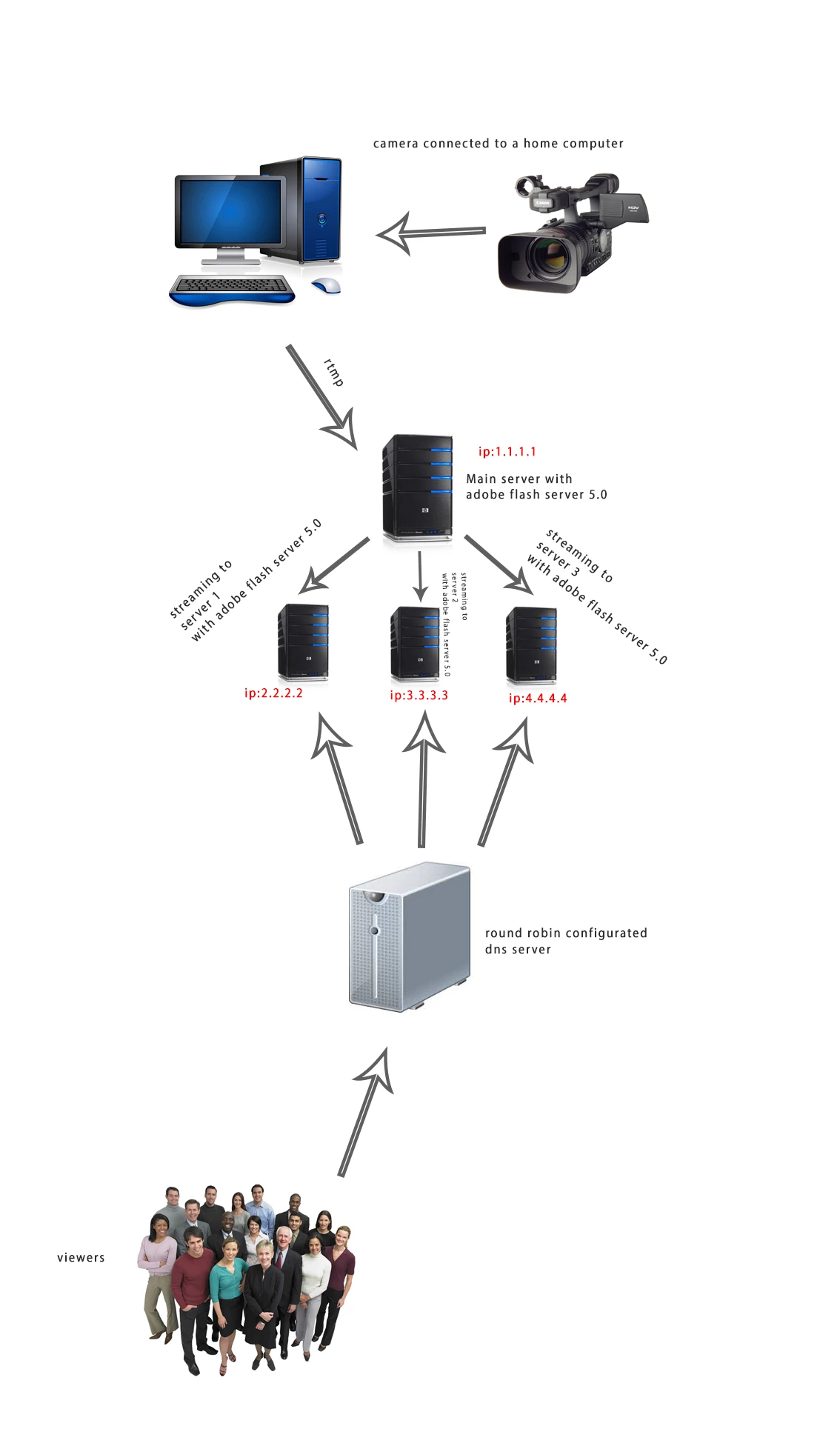
can you kindly help me to build the right " vhost " file for each server as described in the attached model ???
I really appreciate it
Thank you very much
Elad.
----- THE VHOST -----
<VirtualHost>
<!-- This tag contains a list of <Alias> tags. -->
<AliasList>
<!-- You can specify additional names by which to connect to this -->
<!-- virtual host by specifying the name(s) in one or more Alias -->
<!-- tags. Use this tag if you want to be able to connect to this -->
<!-- virtual host with different names. For example, if the name -->
<!-- of this virtual host is "abc.macromedia.com", but you wish -->
<!-- to connect by simply specifying "abc", then you can specify -->
<!-- an alias "abc". Note that "abc" must still map to the same -->
<!-- IP address as "abc.macromedia.com". If more than one virtual -->
<!-- host on the same adaptor has defined the same alias, then -->
<!-- the first match that is found is taken. This may result in -->
<!-- unexpected behavior. -->
<Alias name="alias1"></Alias>
</AliasList>
<!-- Specifies the applications directory for this virtual host. -->
<!-- The applications directory is the base directory where all -->
<!-- applications for this virtual host is defined. An app is -->
<!-- considered to be defined if there exists a directory with -->
<!-- the application name. If nothing is specified in this tag, -->
<!-- the applications directory is assumed to be under the vhost -->
<!-- directory. -->
<AppsDir>${VHOST.APPSDIR}</AppsDir>
<!-- You can override the settings specified in Server.xml for -->
<!-- this vhost by uncommenting the tag below. You can disable -->
<!-- auto-close idle clients for this vhost, or change the max -->
<!-- idle time for clients connected to this vhost. If the max -->
<!-- idle time is not specified here, or invalid (i.e. <= 0), -->
<!-- then we use whatever was set at the server level. -->
<!--
<AutoCloseIdleClients enable="false">
<MaxIdleTime>3600</MaxIdleTime>
</AutoCloseIdleClients>
-->
<!-- Specifies max resource limits for this virtual host. -->
<!-- Resource limits are only honored when running in vhost scope. -->
<ResourceLimits>
<!-- Max number of clients that can connect to this vhost when running as local. -->
<!-- enforced by License key -->
<MaxConnections>-1</MaxConnections>
<!-- Max number of clients that can connect to this vhost when running as remote. -->
<!-- This is enforced by License key -->
<MaxEdgeConnections>-1</MaxEdgeConnections>
<!-- Max number of app instances that can be loaded. -->
<MaxAppInstances>15000</MaxAppInstances>
<!-- Max number of streams that can be created. -->
<MaxStreams>250000</MaxStreams>
<!-- Max number of shared objects that can be created. -->
<MaxSharedObjects>50000</MaxSharedObjects>
<!-- GC interval for application instances resources in minutes : SharedObjects, Streams and Script engine. -->
<AppInstanceGC>1</AppInstanceGC>
</ResourceLimits>
<VirtualKeys>
<!-- Sets the virtual key mappings for connecting players. -->
<!-- When a FlashPlayer or other connects, they receive a -->
<!-- virtual key that corresponds to the ranges below -->
<!-- The virtualKey may be reset as a client property in the -->
<!-- server script. If no key is specified for a player -->
<!-- it will not have a key applied by default: example -->
<!-- <Key from="WIN 7,0,19,0" to="WIN 9,0,0,0">A</Key> -->
</VirtualKeys>
<!-- This section specifies virtual directory mappings for resources -->
<!-- such as recorded streams. By using virtual directories, you can -->
<!-- share resources across different applications. If the beginning -->
<!-- portion of a resource's uri matches the virtual directory that -->
<!-- is specified, then the storage location of the resource maps to -->
<!-- the location specified by the virtual directory mapping. To -->
<!-- specify a virtual directory mapping, you first specify the -->
<!-- virtual directory, followed by a colon, followed by the actual -->
<!-- storage location. Finally the first item in the key mapping -->
<!-- is the virtual key mapping that corresponds to this directory -->
<!-- If the client attempting to play has a key matching this listed -->
<!-- virtual key, it will take that virtual mapping, example: -->
<!-- <Streams key="virtualKey"><virtual dir>;<actual dir></Streams> -->
<VirtualDirectory>
<!-- Specifies virtual directory mapping for recorded streams. -->
<!-- To specify multiple virtual directory mappings for stream, -->
<!-- add additional <Streams> tags; one for each virtual dir -->
<!-- mapping. Syntax for virtual directories is as follows: -->
<!-- <Streams key="virtualKey">foo;c:\data</Streams>. -->
<!-- This maps all streams whose virtual -->
<!-- key matches the listed key, if given and -->
<!-- names begin with "foo/" to the physical directory c:\data. -->
<!-- For example, the stream named "foo/bar" would map to the -->
<!-- physical file "c:\data\bar.flv". Similarly, if you had a -->
<!-- stream named "foo/bar/x", then we first try to find a vdir -->
<!-- mapping for "foo/bar". Failing to do so, we then check for -->
<!-- a vdir mapping for "foo". Since there is one, the stream -->
<!-- "foo/bar" corresponds to the file "c:\data\bar\x.flv". -->
<!-- Virtual keys are optional, but if set allow more than one -->
<!-- mapping -->
<Streams></Streams>
</VirtualDirectory>
<!-- This tag specifies the primary DNS suffix for this vhost. If a -->
<!-- reverse DNS lookup fails to return the domain as part of the -->
<!-- hostname, then this tag is used as the domain suffix. -->
<DNSSuffix></DNSSuffix>
<!-- This tag specifies a comma delimited list of domains that are -->
<!-- allowed to connect to this vhost. If this tag is empty, then -->
<!-- only connections from the same domain that is being connected -->
<!-- to will be allowed. If this tag is not empty, then only the -->
<!-- domains explicitly listed will be accepted. For example, -->
<!-- <Allow>macromedia.com, yourcompany.com</Allow> will only allow -->
<!-- connections from the macromedia.com & yourcompany.com domains. -->
<!-- If you wish to allow localhost connections, you will specify -->
<!-- "localhost". For example, <Allow>localhost</Allow>. To allow -->
<!-- all domains, specify "all". For example, <Allow>all</Allow>. -->
<Allow>all</Allow>
<Proxy>
<!-- A vhost may be configured to run apps locally or remotely. -->
<!-- A vhost that is not explicitly defined gets aliased to -->
<!-- the default vhost and is configured as such. A proxy server -->
<!-- runs all its apps remotely, while a normal server runs all -->
<!-- its apps locally. The following parameter defines whether -->
<!-- this vhost is running local or remote apps, the default is -->
<!-- local. It may be set to either local or remote -->
<Mode>local</Mode>
<!-- This setting specifies the time for which this server -->
<!-- wait for a response from the remote server before -->
<!-- timing out. Time specified is in seconds. Default -->
<!-- value is 2 seconds. -->
<RequestTimeout>2</RequestTimeout>
<!-- Whether this is an anonymous proxy. An anonymous proxy does -->
<!-- not modify the incoming url. This way it does not disturb -->
<!-- the routing of explicitly chained proxies. It is false by -->
<!-- default, must be true for interception proxies. -->
<Anonymous>false</Anonymous>
<!-- Proxy server disk cache settings -->
<CacheDir enabled="false" useAppName="true">
<!-- Specifies the physical location of the proxy cache. By default -->
<!-- they are placed in cache/ in the server installation directory. -->
<!-- The value entered here must be an an absolute path; relative -->
<!-- paths will be ignored and will revert to the default directory. -->
<Path></Path>
<!-- Specifies the maximum allowed size of the disk cache, in -->
<!-- gigabytes. AMS does LRU cleanup of the cache to keep it under -->
<!-- the maximum. The default value is 32 GB. A value of 0 will -->
<!-- disable the disk cache. -->
<MaxSize>32</MaxSize>
</CacheDir>
<!-- A proxy's outgoing connection can be bound to a specific -->
<!-- local ip address. This allows for separating incoming and -->
<!-- outgoing connections onto different network interfaces. This-->
<!-- is useful in configuring a 'Transparent' or 'Interception' -->
<!-- proxy. If a LocalAddress is not specified, then outgoing -->
<!-- connections bind to INADDR_ANY, which is the default. -->
<!-- If a literal address is specified here, the IP version of literal -->
<!-- address must match the IP version of the Origin server's address. -->
<!-- The workaround is to use the hostname of the network interface -->
<!-- (hostname with both A and AAAA DNS records) that will bind to -->
<!-- either the IPv4 or IPv6 address of the interface. -->
<LocalAddress></LocalAddress>
<!-- This section specifies routing information. Administrators -->
<!-- can configure how to route connections based on the desired -->
<!-- destination. -->
<!-- The protocol attribute specifies the protocol to use for -->
<!-- the outgoing connection. If specified, it must be set to -->
<!-- either "rtmp" or "rtmps" to indicate a non-secure or secure -->
<!-- connection respectively. If nothing is specified, the -->
<!-- out-going connection will use the same protocol as the -->
<!-- in-coming connection. You can override this for each route -->
<!-- entry by specifying a protocol tag attribute in each -->
<!-- <RouteEntry> tag. If none is specified, it will use what is -->
<!-- configured in the <RouteTable> tag. -->
<RouteTable protocol="rtmp">
<!-- Maps a host:port pair, to a different host:port pair. -->
<!-- This tag is in the form <host1>:<port1>;<host2>:<port2> -->
<!-- where host1:port1 is the host and port of the desired -->
<!-- destination, and host2 and port2 is what should be used -->
<!-- instead. In other words, connections to host1:port1 are -->
<!-- routed to host2:port2 instead. For example, -->
<!-- <RouteEntry>foo:1935;bar:80</RouteEntry> -->
<!-- This says to route connections destined for host "foo" -->
<!-- on port 1935, to host "bar" on port 80. -->
<!-- We also allow the use of the wildcard character '*' to -->
<!-- replace <host> and/or <port>. For example, -->
<!-- <RouteEntry>*:*;foo:1935</RouteEntry> -->
<!-- This says route connections destined for any host on -->
<!-- any port to host "foo" on port 1935. -->
<!-- '*' can also be used on the right-hand side. When used -->
<!-- on the right-hand side, it means that the corresponding -->
<!-- value on the left-hand side should be used. For example -->
<!-- <RouteEntry>*:*;*:80</RouteEntry> -->
<!-- This says route connections destined for any host on -->
<!-- any port, to the same host on port 80. -->
<!-- Additionally, you can also specify that a host:port -->
<!-- combination be routed to null, which essentially means -->
<!-- that connections destined for that host:port combo will -->
<!-- be rejected. For example, -->
<!-- <RouteEntry>foo:80;null</RouteEntry> -->
<RouteEntry>1.1.1.1:1935;2.2.2.2:1935</RouteEntry>
</RouteTable>
<!-- This section configures edge auto-discovery. When an edge -->
<!-- connects to another server, that server may be part of a -->
<!-- cluster. This edge will try to determine which server in -->
<!-- that cluster we should connect to (which may or may not be -->
<!-- the server specified in the uri). -->
<EdgeAutoDiscovery>
<!-- Specifies whether edge auto discovery is enabled (true) -->
<!-- or disabled (false). Default is disabled. -->
<Enabled>true</Enabled>
<!-- This specifies whether or not to allow overriding edge -->
<!-- auto-discovery (by specifying "rtmpd" protocol). If -->
<!-- enabled, edge auto-discovery is performed by default. -->
<AllowOverride>true</AllowOverride>
<!-- Specifies how long to wait (msec) for auto-discovery. -->
<!-- Warning: don't set this too low. It must be long enough -->
<!-- to establish a TCP connection, perform a UDP broadcast, -->
<!-- collect the UDP resposnes, and return an XML response. -->
<WaitTime>1000</WaitTime>
</EdgeAutoDiscovery>
<!-- If this vhost is remote mode, and you wish to configure the -->
<!-- properties of an out-going ssl connection to an upstream -->
<!-- server, then enable this section and configure SSL props -->
<!-- appropriately. The absence of the <SSL> tag will mean that -->
<!-- ssl connections to upstream servers will use the default -->
<!-- configuration specified in the <SSL> section of Server.xml. -->
<!-- For more information on each of these tags, see comments in -->
<!-- Server.xml. Note: this section if uncommented is ignored if -->
<!-- proxy mode is local. -->
<!--
<SSL>
<SSLVerifyCertificate>true</SSLVerifyCertificate>
<SSLCACertificatePath></SSLCACertificatePath>
<SSLCACertificateFile></SSLCACertificateFile>
<SSLVerifyDepth>9</SSLVerifyDepth>
<SSLCipherSuite>ALL:!ADH:!LOW:!EXP:!MD5:@STRENGTH</SSLCipherSuite>
</SSL>
-->
<!-- When a VHost is configured as proxy, the "enabled" -->
<!-- attribute will determine whether aggregate messages will -->
<!-- be delivered from the edge cache. Default is "true". -->
<!-- If the edge server receives aggregate messages from the -->
<!-- origin when this setting is disabled, the messages will -->
<!-- be broken up before being cached. -->
<AggregateMessages enabled="true">
<!-- This setting determines the size (in bytes) of aggregate -->
<!-- messages returned from the edge cache (when aggregate -->
<!-- messages are enabled). Note that this setting only -->
<!-- applies to messages retrieved from the disk cache. -->
<!-- Aggregate messages received directy from the origin server-->
<!-- will be returned as-is, and therefore their size is -->
<!-- determined by the origin server's settings for aggregate -->
<!-- message size. Default is 65536 -->
<!-- <MaxAggMsgSize>65536</MaxAggMsgSize> -->
<!-- Maximum Duration in Millisconds of an aggregate message while -->
<!-- reading from edge disk cache. Default is 10000 Millisconds. -->
<!-- <MaxAggMsgDuration>10000</MaxAggMsgDuration > -->
</AggregateMessages>
</Proxy>
<!-- This section controls some of the logging behaviors. -->
<Logging>
<!-- This section controls access log. -->
<Access>
<!-- You can override the settings specified in Server.xml for -->
<!-- this vhost by uncommenting the tag below. You can disable -->
<!-- logging checkpoints for this vhost, or change the -->
<!-- checkpoint interval of this vhost. If the checkpoint -->
<!-- interval is not specified here, or invalid (i.e. <= 0), -->
<!-- then we use whatever was set at the server level. -->
<!--
<Checkpoints enable="false">
<LogInterval>3600</LogInterval>
</Checkpoints>
-->
</Access>
</Logging>
</VirtualHost>


 AdChoices