
February 26, 2012
Question

Client side "Buffering..." issues

  • February 26, 2012
  • 1 reply
  • 3898 views

I am having issues with the client side on different devices once they click on play.  I've tried a single bit-rate, multi bit-rate and they seem to get "buffering..." and it sits there or goes to a black screen.  When I check the performance of the stream, I'm getting very good readings (20% CPU, 10% memory and 2 Mbps total bandwidth consumtion).  I have fiber at my office running 20/20 which is plenty of bandwidth to support 3 streams.  I've tried various frame rates and bitrates using H.264 and AAC. Ran accross a grat article/calculator for optimal frame dimensions and bitrates for Flash video (http://www.adobe.com/devnet/flash/apps/flv_bitrate_calculator.html). In FLME, my last configuration was as follows:
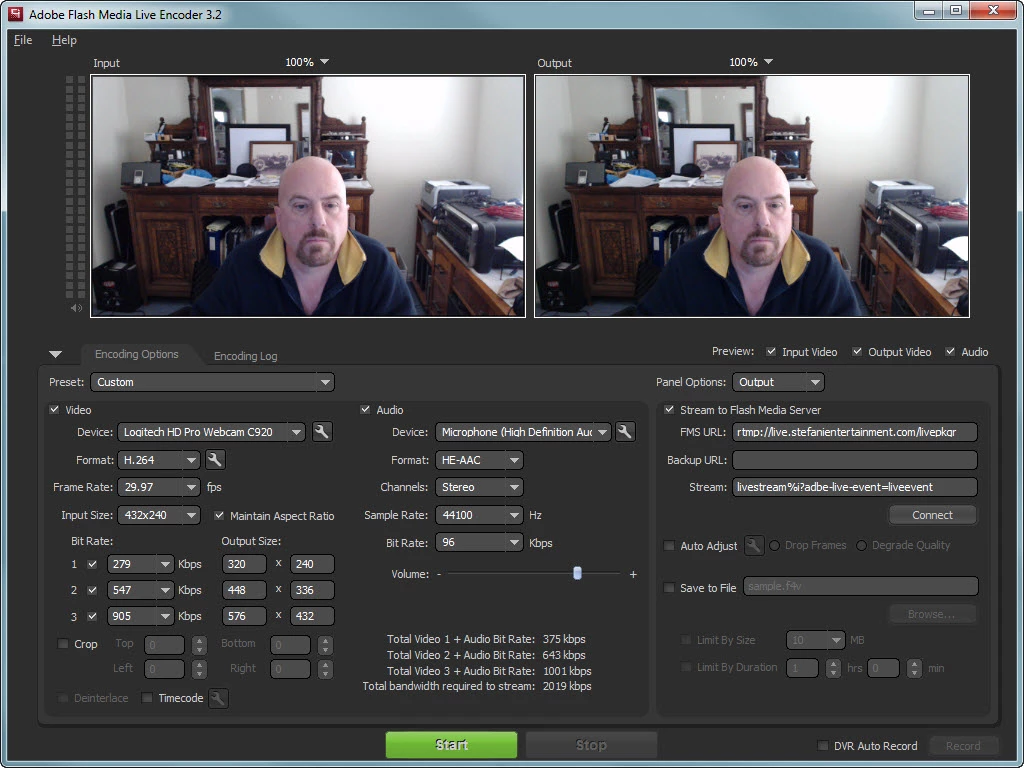
As you can see, I'm using 3 streams and total bandwidth consumption is 2019 which using Robert Reinhardt's calculator is more like 2400-2500.  Still plenty at 12% of bandwidth consumption.  I've tried knocking it down to a single stream (lowest footprint) and still get the "Buffering..." issues.  Any ideas here?

This topic has been closed for replies.

1 reply

Adobe Employee
February 27, 2012

Your settings looks ok for me - i am not sure the change i would recommend is one which is causing the issue - but i think you should try it out. I think your audio bitrate is way too high - for what is recommeded by Apple - can you bring to 40kbps and see if that makes any difference. Also is FMLE and FMS are on same machine or on two different machine - i just want to be sure CPU numbers which you have given are FMS machine based and there is no other major process which is taking CPU cycles.

February 27, 2012

SE_0208,

I rebuilt my server.  FMLE and FMS are on two different machines.  FMS is on my Windows Server 2008 R2 box and FLME is on my laptop.  Two different locations.  At my office (Windows 2008 R2) is 30/30Mbps and my home office is 15/5Mbps.  Question for you.  On the FMS server I can use the FMS Sample Video Player and stream to URL: http://localhost/hds-live/livepkgr/_definst_/liveevent/livestream1.f4m (or livestream2 or 3) with no issues.  However, when I try it from the outside using OSMF Stobe Player (online at OSMF.org) I can't access: http://live.stefanientertainment.com/hds-live/livepkgr/_definst_/liveevent/livestream1.f4m (or livestream2 or 3). Firewall is open on TCP 80, 1935 and 8134. the FMS Server private IP is 172.31.0.10 and the NATed IP address is 72.67.34.164.  Are there any conf files I need to add either the private IP address or public natted IP address to?  Also, the crossdomain.xml file, I don't want to include a wildcard to allow all domains as this puts a security hole to this server.  I will bring down the audio which is HE-AAC to 40kbps and Sampling rate to 22.05Khz.

Thanks,

Gio

February 27, 2012

I also added the following to my httpd.conf file for Apache so it includes my private subnet 172.31.0.0/24 and Public natted host for the FMS server 72.67.34.164/32

<Location /server-status>

    SetHandler server-status

    Order deny,allow

    Deny from all

    Allow from 10.0.0.0/8

    Allow from 172.16.0.0/12

    Allow from 172.31.0.0/24

    Allow from 192.168.0.0/16

    Allow from 127.

# Added the following for Public natted IP address

    Allow from 72.67.34.164/32

</Location>

ExtendedStatus On

<Location /server-info>

    SetHandler server-info

    Order deny,allow

    Deny from all

    Allow from 10.0.0.0/8

    Allow from 172.16.0.0/12

    Allow from 172.31.0.0/24

    Allow from 192.168.0.0/16

    Allow from 127.

# Added the following for Public natted IP address

    Allow from 72.67.34.164/32

</Location>