
FMS proxying HTTP does not close sockets correctly?
Hi,
So, after waiting for a while, we decided to upgrade our streamers to FMS 3.5.3 and set them up to proxy HTTP requests to a lighttpd server instead of the "built in" Apache. With the previous version 3.5 of FMS, we had problems of FMS hanging up after a while and stopping relaying requests, generally a few hours, even when it did not serve a lot of requests. With version 3.5.3, we had great hopes that this problem had disappeared as we had FMS running for more than a month on a test server. So we did the upgrade and we encounter another problem:
After less that one day of activity, our servers crashed for an unknown reason, almost at the same time. Analysing the logs, I saw out of memory messages, but how could two linux servers stop working in the same 5 minutes interval. I supposed there was a power failure of some sort. And I kept analysing because the sysadmins in the server room swore that they saw out of memory kernel panic on the consoles. After a bit of investigation, I found the reasons: the TCP connexions between FMS and the lighttpd server are stacking up and fill the OS network memory! Now, I don't know who is the culprit:
- FMS code does not manage correctly HTTP proxy sessions?
- lighttpd does not handle correctly HTTP proxying from FMS and does not close correctly the sessions?
- Our Ubuntu linux network stack is not correctly configured to manage so many connexions?
Here are the details, any assistance is welcome!
The servers: linux Ubuntu 8.04 with 8 GB RAM.
FMS 3.5.3 proxying to lighttpd 1.4.19 listening on port 81. FMS and lighttpd are set up on the same server.
The streamer receives many (> 10/s) HTTP requests from iPhones which are proxied to lighttpd. iPhones request partial content and lighttpd is well suited for these type of requests.
Locking at the state of the TCP stack:
# netstat -st
IcmpMsg:
InType3: 6
InType8: 5501
OutType0: 5501
OutType3: 6
Tcp:
101662 active connections openings
1192680 passive connection openings
33 failed connection attempts
177391 connection resets received
1653 connections established
73559682 segments received
70196072 segments send out
165137 segments retransmited
0 bad segments received.
37219 resets sent
UdpLite:
TcpExt:
22 resets received for embryonic SYN_RECV sockets
141884 packets pruned from receive queue because of socket buffer overrun
2052 packets pruned from receive queue
40293 TCP sockets finished time wait in fast timer
801 time wait sockets recycled by time stamp
711318 delayed acks sent
2401 delayed acks further delayed because of locked socket
Quick ack mode was activated 535 times
68554 packets directly queued to recvmsg prequeue.
11705 bytes directly in process context from backlog
341070 bytes directly received in process context from prequeue
5114830 packet headers predicted
22083 packets header predicted and directly queued to user
32542120 acknowledgments not containing data payload received
25289961 predicted acknowledgments
9191 times recovered from packet loss due to fast retransmit
6222 times recovered from packet loss by selective acknowledgements
Detected reordering 7 times using FACK
Detected reordering 1 times using SACK
Detected reordering 7 times using reno fast retransmit
Detected reordering 9 times using time stamp
15 congestion windows fully recovered without slow start
42 congestion windows partially recovered using Hoe heuristic
17 congestion windows recovered without slow start by DSACK
16517 congestion windows recovered without slow start after partial ack
51 TCP data loss events
3916 timeouts after reno fast retransmit
3372 timeouts after SACK recovery
10048 timeouts in loss state
9157 fast retransmits
6 forward retransmits
28990 retransmits in slow start
30176 other TCP timeouts
7656 classic Reno fast retransmits failed
95 SACK retransmits failed
2738020 packets collapsed in receive queue due to low socket buffer
52 DSACKs sent for old packets
52 DSACKs received
3 connections reset due to unexpected data
74950 connections reset due to early user close
2846 connections aborted due to timeout
TCP ran low on memory 10 times
TCPDSACKIgnoredOld: 41
IpExt:
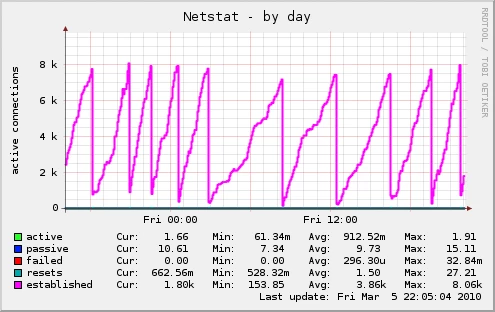
The last red line can be visualised below; sometimes the server crashes in out of memory kernel panic...
And if you compare with previous behavior, you can tell when we did the upgrade to FMS 3.5.3...
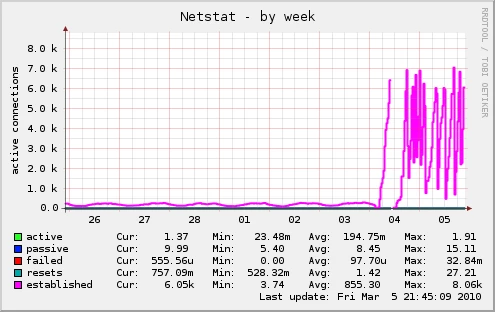
A few words on our previous configuration with FMS 3.5. To be able to accept HTTP requests, we have a front load balancer which is able to route HTTP requests to lighttpd and RTMP requests to FMS. But with this configuration, we don't benefit from the ability of FMS to fallback to RTMPT for clients behind a proxy or proxy ol' HTTP requests... With the previous configuration, we never had so many connections active simultaneously: we change from 200 max to more than 7000 with FMS 3.5.3 in proxy!
Some figures on what exactly happens:
# netstat -tn | grep :81 | awk '{print $6}' | sort | uniq -c
20 CLOSE_WAIT
2245 ESTABLISHED
1236 FIN_WAIT1
5 TIME_WAIT
# netstat -tn
Active Internet connections (w/o servers)
Proto Recv-Q Send-Q Local Address Foreign Address State
tcp 0 275841 127.0.0.1:81 127.0.0.1:45088 FIN_WAIT1
tcp 562347 0 127.0.0.1:55150 127.0.0.1:81 ESTABLISHED
tcp 0 225152 127.0.0.1:81 127.0.0.1:34856 ESTABLISHED
tcp 0 238081 127.0.0.1:81 127.0.0.1:54310 FIN_WAIT1
tcp 0 114433 127.0.0.1:81 127.0.0.1:51810 FIN_WAIT1
tcp 670800 0 127.0.0.1:40746 127.0.0.1:81 ESTABLISHED
tcp 597444 0 127.0.0.1:40654 127.0.0.1:81 ESTABLISHED
tcp 592810 0 127.0.0.1:40669 127.0.0.1:81 ESTABLISHED
tcp 0 103168 127.0.0.1:81 127.0.0.1:54544 ESTABLISHED
tcp 0 201344 127.0.0.1:81 127.0.0.1:40567 ESTABLISHED
tcp 0 0 10.1.74.30:1935 10.1.74.2:60372 ESTABLISHED
tcp 665360 0 127.0.0.1:45282 127.0.0.1:81 ESTABLISHED
tcp 0 210432 127.0.0.1:81 127.0.0.1:40662 ESTABLISHED
tcp 0 207361 127.0.0.1:81 127.0.0.1:44895 FIN_WAIT1
tcp 0 109825 127.0.0.1:81 127.0.0.1:52144 FIN_WAIT1
tcp 0 221825 127.0.0.1:81 127.0.0.1:54844 FIN_WAIT1
tcp 0 103168 127.0.0.1:81 127.0.0.1:40791 ESTABLISHED
tcp 782301 0 127.0.0.1:55074 127.0.0.1:81 ESTABLISHED
tcp 0 219137 127.0.0.1:81 127.0.0.1:45040 FIN_WAIT1
tcp 0 209921 127.0.0.1:81 127.0.0.1:44837 FIN_WAIT1
tcp 574170 0 127.0.0.1:45275 127.0.0.1:81 ESTABLISHED
tcp 0 252033 127.0.0.1:81 127.0.0.1:54907 FIN_WAIT1
tcp 0 254977 127.0.0.1:81 127.0.0.1:54515 FIN_WAIT1
tcp 0 142977 127.0.0.1:81 127.0.0.1:52129 FIN_WAIT1
In case this is needed, FMS configuration is almost out of the box:
_defaultRoot_/Adaptor.xml:
<HTTPTunnel>
<Enable>true</Enable>
<NodeID></NodeID>
<IdlePostInterval>512</IdlePostInterval>
<IdleAckInterval>512</IdleAckInterval>
<IdleTimeout>60</IdleTimeout>
<MimeType>application/x-fcs</MimeType>
<WriteBufferSize>16</WriteBufferSize>
<SetCookie>true</SetCookie>
<Redirect enable="false" maxbuf="16384">
<Host port="80">:8080</Host>
<Host port="443">:8443</Host>
</Redirect>
<HttpProxy enable="true" maxbuf="16384">
<Host port="80">${HTTPPROXY.HOST}</Host>
</HttpProxy>
<NeedClose>true</NeedClose>
<MaxWriteDelay>20</MaxWriteDelay>
<MinWriteDelay>12</MinWriteDelay>
<MaxHeaderLineLength>1024</MaxHeaderLineLength>
</HTTPTunnel>
I've tried changing lighttpd configuration to handle KeepAlive session or not, it has no influence on the behaviour.
If you spot a configuration mistake or have any idea, I'm ready to test it as soon as possible... Asa?
Thanks


 AdChoices